
After hardening authentication mechanisms, reducing legacy protocol exposure and tightening permissions, one major attack surface often remains largely untouched: internal name resolution and automatic network configuration. These mechanisms were designed to keep environments operational under imperfect conditions, but they also introduce implicit trust that attackers are quick to exploit.
Network poisoning attacks do not rely on vulnerabilities or exploits. They rely on normal protocol behavior. By abusing how systems look up names and obtain network configuration, attackers can intercept credentials and redirect traffic without ever touching a domain controller.
This month focuses on disabling legacy name resolution protocols such as LLMNR, NBT-NS and mDNS, and on mitigating DHCPv6-based poisoning attacks.
Why name resolution becomes an attack surface
In Active Directory environments, DNS is the authoritative source for name resolution. When a user or system wants to connect to a resource, it queries DNS to determine where that resource is located. As long as DNS provides a valid answer, the process is predictable and controlled.
The problem starts when DNS cannot answer the request. This happens in many everyday situations: a user mistypes a hostname, a script references a server that no longer exists, a printer name is outdated or a DNS record is temporarily unavailable. Instead of simply failing, Windows tries to recover gracefully.
When DNS cannot resolve a name, Windows can fall back to local name resolution protocols. LLMNR and mDNS send a multicast query to the local network, while NBT-NS uses broadcast. In effect, the system asks every device on the same network segment: "Does anyone know this host?" Whoever answers is trusted.
This entire flow happens automatically and without user awareness. From the user's point of view, they simply tried to open a resource.
From an attacker's perspective, this behavior is ideal. If they are present on the same network segment, they do not need to compromise DNS or any other infrastructure. They only need to answer.
How LLMNR, NBT-NS and mDNS are abused in practice
LLMNR, NBT-NS and mDNS were designed for small networks without a DNS server. None of them offer a way to verify that the device answering a request is actually the requested host. Wherever these protocols are enabled, an attacker on the local network can claim to be any host that DNS fails to resolve.
An attacker with access to the internal network runs a tool such as Responder, which listens for LLMNR, NBT-NS and mDNS requests. As soon as a request is observed, Responder replies with the attacker's own IP address, claiming to be the requested host. The victim accepts the answer and connects to the attacker-controlled device.
If the victim connects to a service that uses automatic authentication, such as SMB, Windows silently authenticates with the credentials of the logged-on user. In an NTLM authentication flow, this exposes a NetNTLMv2 challenge-response that the attacker can try to crack offline or, where protections are insufficient, relay to another system.
The screenshot below shows this attack in practice. A user on the system with IP address 192.168.56.12 tried to connect to pintserverResilix. This hostname does not exist; it is a simple typo of a print server name. Because DNS could not resolve the name, the system sent out an LLMNR request over both IPv4 and IPv6, asking whether any device on the network knew this host.
Responder answered with a poisoned response, claiming to be pintserverResilix. The system then connected to the attacker over SMB and automatically attempted to authenticate, exposing the NetNTLMv2 challenge-response of the user ESSOS\Benjamin.

What makes this attack particularly effective is that it relies entirely on normal behavior. Users are not tricked into clicking links or running malware. A single typo while accessing a network resource is enough.
Why servers are equally vulnerable
This fallback behavior is not limited to user workstations. Servers follow the same name resolution logic and are often even more exposed, because they run automated processes. Scheduled tasks, scripts, backup jobs and applications regularly reference hostnames that were renamed, decommissioned or never existed in DNS.
If an attacker answers such a request, the server connects to the attacker-controlled system. Whether this also exposes authentication material depends on the service and the account used for that connection. Because servers often run under service accounts or computer accounts with elevated privileges, the authentication material exposed in this scenario can be far more sensitive than that of a regular user. A single outdated script or mistyped hostname can expose high-value credentials without any administrator interaction.
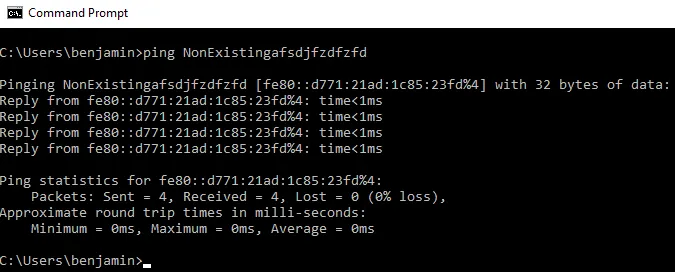
The screenshot below shows a server attempting to ping a non-existent hostname. Instead of failing, the name is resolved to fe80::d771:21ad:1c85:23fd, the IPv6 link-local address of the attacker's system.
The impact of intercepted authentication hashes
In the example above, the attacker captured a NetNTLMv2 challenge-response for Benjamin's account. This is not the account's NT hash and cannot be used directly for Pass-the-Hash. It can, however, be cracked offline, without any further interaction with the domain and without generating failed logon events.
Using wordlists, rule sets or targeted brute-force techniques with tools such as Hashcat, an attacker can attempt to recover the plaintext password. Whether this succeeds depends almost entirely on password strength. In environments where predictable patterns, reused passwords or weak passphrases are common, cracking NetNTLMv2 hashes is a realistic outcome rather than a theoretical risk. This is exactly why the password hygiene measures from the first step of this roadmap remain so important.
Once the password is recovered, the attacker no longer depends on intercepted traffic. They can authenticate directly as Benjamin, access resources legitimately and continue expanding their foothold within the environment.
Cracking is not the only option. As shown in the previous post on SMB, NTLM and Legacy Authentication Hardening (https://www[.]resilix[.]be/blog/ad-security-4/smb-ntlm-and-legacy-authentication-hardening-65), a captured authentication attempt can also be relayed in real time to systems where SMB signing is not enforced, without ever recovering the password.
Disabling LLMNR, NBT-NS and mDNS
The most effective way to prevent name resolution poisoning is to remove the insecure fallback mechanisms altogether. In a properly configured Active Directory environment, DNS should be the only method used to resolve hostnames. Every additional name resolution protocol creates ambiguity and gives attackers an opportunity to impersonate legitimate systems.
The key principle is consistency. Disabling only one fallback protocol while leaving the others enabled still allows attackers to abuse name resolution. LLMNR, NBT-NS and mDNS should therefore be addressed together.
Disabling LLMNR via Group Policy
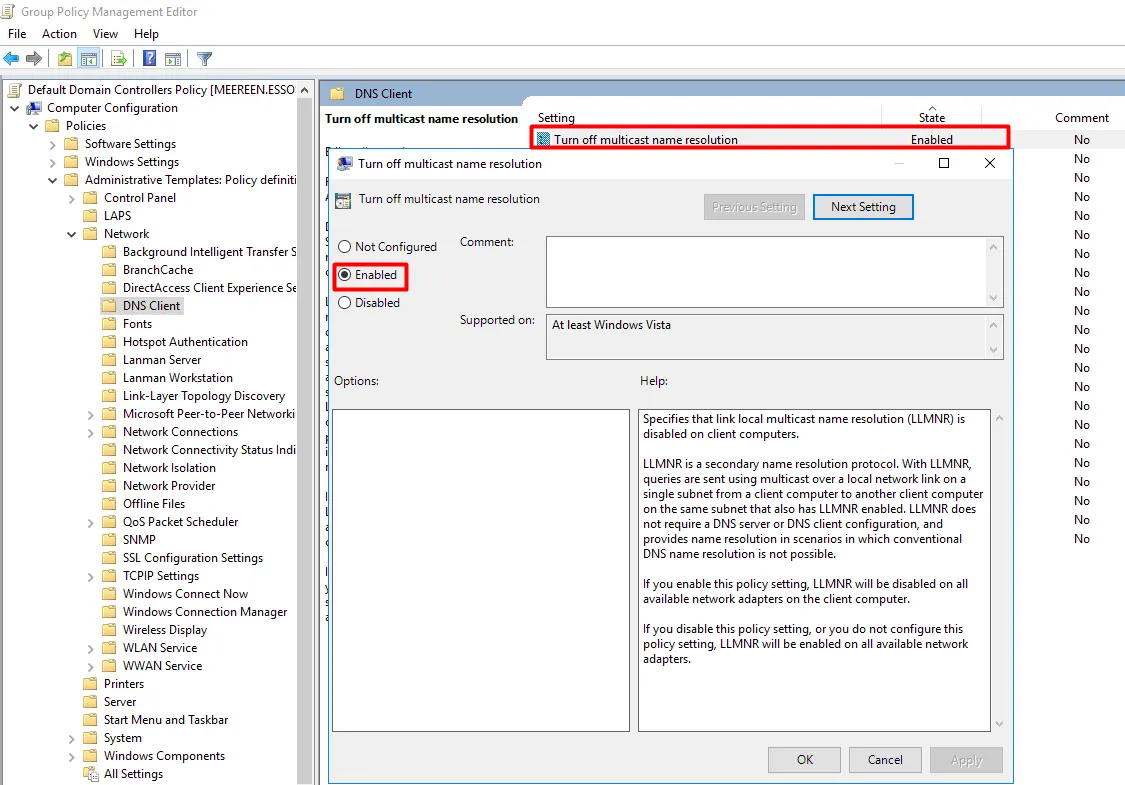
LLMNR is enabled by default on Windows and can be disabled centrally through Group Policy at the computer level. The relevant setting can be found in the Group Policy Management Editor at:
Computer Configuration -> Policies -> Administrative Templates -> Network -> DNS Client
Within this section, the following policy should be set to Enabled:
- Turn off multicast name resolution
Once the policy is applied, the Windows DNS client no longer sends LLMNR requests on any of its network adapters. This policy is aimed at LLMNR; mDNS is configured separately, as described below.
In our lab environment, the setting was configured in the Default Domain Controllers Policy, so the test below was performed on a domain controller. In production, use a dedicated GPO that applies to all systems.
The screenshot below shows the same ping command after the policy was applied. The non-existent hostname can no longer be resolved through a poisoned answer, and the request fails as it should.

Disabling NBT-NS
NBT-NS is disabled by turning off NetBIOS over TCP/IP. While this can be configured manually per network adapter, it should be enforced centrally to ensure it is applied consistently across all systems:
- For DHCP clients, set the Microsoft vendor-specific DHCP option 001 (Microsoft Disable Netbios Option) to 0x2.
- For systems with a static IP configuration, set the NetbiosOptions registry value to 2 for each network interface under HKLM\SYSTEM\CurrentControlSet\Services\NetBT\Parameters\Interfaces , for example through a startup script or Group Policy Preferences.
Recent administrative templates (Windows 11 22H2 and later) also include the Configure NetBIOS settings policy in the same DNS Client section. When set to disable NetBIOS name resolution, this policy stops the DNS client from using NetBIOS to resolve names, but does not disable NetBIOS over TCP/IP itself.
In modern environments, NetBIOS is rarely required and should be treated as legacy behavior. Before disabling it, verify that no legacy applications or devices still depend on it.
Disabling mDNS
mDNS requires a separate approach. Windows has supported mDNS natively since Windows 10, and Microsoft positions it as the successor to LLMNR and NetBIOS name resolution. In addition, browsers, collaboration tools and other applications may implement their own mDNS functionality, independently of the Windows DNS client.
For the Windows DNS client, the administrative templates for Windows 11 24H2 and later include the Configure multicast DNS (mDNS) protocol policy in the same DNS Client section. Setting this policy to Disabled turns off mDNS in the DNS client. On older versions, the same result can be achieved by setting the EnableMDNS registry value to 0 under HKLM\SYSTEM\CurrentControlSet\Services\Dnscache\Parameters, for example through Group Policy Preferences.
Because applications can generate their own mDNS traffic, this setting alone should not be assumed to disable mDNS everywhere. Where needed, Windows Defender Firewall rules that block outbound traffic to UDP port 5353 and inbound traffic on UDP port 5353 can close the remaining gaps.
Disabling mDNS may also affect features such as printer discovery or screen casting, so test the impact on representative systems first.
Impact of disabling fallback name resolution
Once LLMNR, NBT-NS and mDNS are disabled, a failed DNS lookup simply fails. Systems no longer ask the local network for help, and attackers lose the opportunity to answer on behalf of a host that does not exist. A typo in a hostname or an outdated script results in an error message instead of exposed credentials.
After applying the changes, verify the result on representative systems rather than assuming the policies work as intended. A packet capture filtered on UDP ports 5355 (LLMNR), 137 (NBT-NS) and 5353 (mDNS) quickly shows which systems still send these requests.
DHCPv6-based poisoning attacks
While name resolution fallback mechanisms already introduce significant risk, automatic network configuration adds another layer of implicit trust that is often overlooked. DHCPv6 poisoning abuses the fact that modern operating systems configure themselves automatically, even when IPv6 is not intentionally deployed.
Why DHCPv6 becomes an attack surface
In many environments, IPv6 is assumed to be "not in use". In reality, IPv6 is enabled by default on every supported Windows version, and Windows actively requests IPv6 configuration through DHCPv6, for example when it starts or connects to a network.
In practice, Windows clients have no way to verify whether the responding DHCPv6 server is legitimate. In a network without IPv6 infrastructure, there is no legitimate DHCPv6 server to answer these requests, which leaves the door wide open for an attacker to answer instead.
This is where the attack becomes powerful. Through DHCPv6, the attacker assigns the victim an IPv6 address and configures their own system as the DNS server. Because Windows prefers IPv6 over IPv4, the attacker's IPv6 DNS server takes precedence over the legitimate DNS server configured through IPv4. The attacker effectively becomes the primary DNS server of the victim.
From a defensive point of view, this is invisible. Nothing appears misconfigured, IPv4 connectivity keeps working and users notice nothing.
How DHCPv6 poisoning is abused in practice
Using a tool such as mitm6, the attacker listens for DHCPv6 requests on the local network and answers them as if they were a legitimate DHCPv6 server. No credentials or prior access to the domain are required. The attacker only needs to be connected to the same network segment.
The screenshot below shows mitm6 running on the attacker's system with IPv4 address 192.168.56.128 and IPv6 link-local address fe80::d771:21ad:1c85:23fd. Shortly after mitm6 is started, several systems accept an IPv6 address from the attacker, including a workstation, member servers and even domain controllers such as meereen.essos.local, kingslanding.sevenkingdoms.local and winterfell.north.sevenkingdoms.local. From that moment on, these systems send their DNS queries to the attacker.

What makes this attack particularly dangerous is that it does not depend on user mistakes. Unlike LLMNR poisoning, no typo or outdated hostname is required. Simply connecting a system to the network, or rebooting it, is enough.
Credential interception through DHCPv6 poisoning
Once the attacker controls DNS resolution, they can selectively answer queries for specific hostnames with their own IP address, while leaving all other traffic untouched to avoid disruption. When a system then connects to the attacker for a service that uses automatic authentication, an authentication attempt is sent to the attacker.
A well-known example is WPAD (Web Proxy Auto-Discovery). Windows and browsers may look up a host named wpad to automatically discover proxy settings. By answering this lookup, the attacker can present themselves as the proxy server and trigger NTLM authentication attempts from the victim.
In practice, mitm6 is commonly combined with a relay tool such as ntlmrelayx. Intercepted authentication attempts, including those of computer accounts, can then be relayed in real time to other services. A common target is LDAP on domain controllers. Where LDAP signing and channel binding are not enforced, a relayed authentication can be abused to create computer accounts, modify object permissions or configure resource-based constrained delegation. This can lead to the compromise of individual systems or even the entire domain. The LDAP, permissions and SMB hardening steps from the previous posts in this roadmap are therefore a direct defense against this attack chain.
These authentication attempts occur without any warning to the user. From the system's point of view, it is simply connecting to the host its DNS server pointed it to.
Mitigating DHCPv6 poisoning
Disabling IPv6 on Windows systems is often suggested as a quick fix, but it should not be the default mitigation. Microsoft advises against disabling IPv6 or unbinding it from network interfaces, because Windows components depend on it and may not function correctly without it.
Blocking rogue DHCPv6 and Router Advertisements on the network
On supported access switches, DHCPv6 Guard (or DHCPv6 snooping) can block DHCPv6 responses coming from unauthorized ports. RA Guard can separately block unauthorized Router Advertisements. Together, these controls ensure that only designated infrastructure can provide IPv6 configuration to clients. They should be configured according to the actual network design and verified from a client port.
Blocking DHCPv6 on Windows systems via Group Policy
Where IPv6 is not intentionally deployed, or where switch-level controls are not available, rogue DHCPv6 can also be blocked on the systems themselves using Windows Defender Firewall. The relevant settings can be found in the Group Policy Management Editor at:Computer Configuration -> Policies -> Windows Settings -> Security Settings -> Windows Defender Firewall with Advanced Security
Within this section, the following predefined Core Networking rules should be added with the action set to Block:
- Inbound: Core Networking - Dynamic Host Configuration Protocol for IPv6 (DHCPV6-In)
- Inbound: Core Networking - Router Advertisement (ICMPv6-In)
- Outbound: Core Networking - Dynamic Host Configuration Protocol for IPv6 (DHCPV6-Out)
Once these rules are applied, systems no longer request or accept IPv6 configuration through DHCPv6 or Router Advertisements, while IPv6 itself remains enabled.
This configuration should not be applied blindly. In environments that do use IPv6 with DHCPv6 or Router Advertisements, these rules will break legitimate IPv6 configuration. In that case, network-level controls such as DHCPv6 Guard and RA Guard are the right approach.
Reducing the impact of DNS takeover
Defense in depth remains important. If WPAD is not used in the environment, automatic proxy detection should be disabled centrally. More importantly, the hardening measures from earlier in this roadmap, such as enforcing LDAP signing and channel binding, enforcing SMB signing and restricting who can create computer objects, make it significantly harder to relay intercepted authentication attempts into meaningful access.
Impact of mitigating DHCPv6 poisoning
Once DHCPv6 poisoning paths are removed, systems no longer accept network configuration from arbitrary devices on the network. Attackers lose a reliable and silent way to take over DNS resolution, and forced authentication attempts no longer occur simply because a system joined the network.
This closes an attack vector that is particularly effective in environments that believe IPv6 is "not in use" and therefore not a concern. IPv6 and DHCPv6 should be treated as part of the identity attack surface, not as an unused networking feature.
What needs to change
Network poisoning succeeds because too much trust is placed in automatic network behavior. Name resolution fallbacks and dynamic configuration protocols were designed to keep systems working, not to verify whether the network can be trusted. In modern environments, that assumption no longer holds.
The first requirement is visibility. Organizations need to know which systems still send LLMNR, NBT-NS and mDNS requests, which applications depend on them and whether DHCPv6 and Router Advertisements are present on networks where IPv6 has not been intentionally deployed.
Next, deliberate choices must be made. LLMNR, NBT-NS and mDNS should be disabled unless there is a clear and documented requirement to keep them, and DNS should be the single authoritative source for name resolution. IPv6 configuration should only be accepted from trusted sources, enforced on the network through DHCPv6 Guard and RA Guard, or on the systems themselves through firewall rules.
Changes in this area should be applied in phases, starting with servers and domain controllers and expanding to workstations. Where exceptions are required, they should be documented, scoped and reviewed regularly. Assumptions about "trusted networks" should be replaced with enforced controls and verified behavior.
Closing thoughts
Network poisoning attacks are effective because they exploit behavior that feels normal. Systems ask for help, the network answers and authentication happens automatically. Nothing crashes, nothing alerts and users continue working as usual.
Throughout this month, the recurring theme is not broken technology, but misplaced trust. Name resolution fallbacks and automatic network configuration assume that anyone on the network is friendly. Attackers take advantage of that assumption by quietly inserting themselves into those flows.
By removing insecure fallbacks and tightening control over network configuration, organizations eliminate some of the quietest and most reliable credential interception techniques available to attackers. These changes do not add complexity, they remove ambiguity.
This month builds naturally on the previous steps in the roadmap. With credentials protected, privileges controlled, Kerberos hardened, permissions and LDAP secured and SMB and NTLM hardened, removing network poisoning opportunities further reduces the attacker's room to maneuver. Each compromise becomes harder to start and harder to expand.
Security in Active Directory is rarely about one single setting. It is about making normal behavior safe, even in the presence of a malicious actor on the network.
Let's Connect
Are you in need of assistance from our Active Directory Experts, or are you left with some questions after reading this blog post? Don't hesitate to fill out the contact form below!