
After addressing credential exposure and password hygiene, the next logical step in Active Directory hardening is privileged account control. If credentials determine how an attacker gets in, privileged accounts determine how far they can go.
In many environments, weaknesses don’t exist in isolation. Missing patches, configuration issues, and excessive privileges tend to accumulate over time. Domain Administrator access is often granted out of convenience rather than treated as a last-resort capability. As the number of highly privileged accounts increases, so does the attack surface, making it easier for relatively small issues to escalate into full domain compromise.
This month focuses on reducing that attack surface by tightening control over privileged accounts and enforcing a clear separation between administrative and user identities.
The attacker’s perspective on privileged access
Why privileged accounts matter
From an attacker’s perspective, privileged accounts are the objective. Gaining Domain Admin access effectively means owning the environment. It allows full control over authentication, authorization, persistence and recovery.
What makes this particularly dangerous is that attackers rarely need to exploit vulnerabilities to obtain these privileges. In many cases, they simply find an account that already has them.
Common problems include too many users in Domain Admin groups, inactive privileged accounts that were never removed, disabled accounts that still exist and unclear separation between day-to-day user activity and administrative actions.
Each of these issues increases the chance that a compromise turns into a full domain takeover.
How attackers approach privileged access
Assume an attacker has access to a standard domain user account. At this point, the goal is no longer just discovery of credentials, but identification of privilege paths.
The attacker wants to know which accounts have elevated rights, which of those accounts are active, which are still enabled despite not being used, and which might be easier to compromise due to weak hygiene.
This typically starts with enumerating privileged groups and their members. Domain Admins, Enterprise Admins, Schema Admins and custom high-privilege groups are prime targets. The attacker then looks at how those accounts are used, where they log in and whether they are exposed through shared credentials, scripts, endpoint access, and similar weaknesses.
In many environments, this analysis alone already reveals multiple viable paths to full compromise.
This enumeration rarely stops at Domain Admins and Enterprise Admins. Attackers routinely look for less obvious groups that still provide viable escalation paths.
Beyond Domain Admins
Other important privileged groups
When privileged access is discussed, the focus is often limited to Administrators, Domain Admins and Enterprise Admins. While these groups undeniably represent the highest level of control, they are not the only groups that matter from a security perspective. Several built-in Active Directory groups provide powerful privileges that are frequently underestimated or misunderstood.
From an attacker’s point of view, these groups are especially attractive because they are often overlooked. Membership is commonly granted for operational convenience, legacy reasons or historical troubleshooting, without a clear understanding of the security implications.
DNSAdmins
Members of the DNSAdmins group can effectively execute code on Domain Controllers when certain conditions are met. If the DNS service is running on a Domain Controller, members of this group can configure a malicious or arbitrary DLL to be loaded by the DNS service. Upon (re)starting the DNS service, this results in code execution as SYSTEM on the Domain Controller.
In practice, this means that DNSAdmins can be equivalent to Domain Admins in terms of impact, even though the group is often treated as far less sensitive. This risk is frequently underestimated, despite the fact that DNSAdmins do not require Domain Admin privileges to perform this attack.
Schema Admins
Schema Admins have the ability to modify the Active Directory database schema. While schema changes are rare in day-to-day operations, they have forest-wide impact. Malicious or incorrect schema modifications can introduce long-term backdoors, weaken security controls or permanently affect directory stability. For this reason, Schema Admin privileges should only be granted temporarily and under strict change control.
Account Operators
Microsoft classifies the Account Operators group as a service administrator group, as it can modify the Server Operators group, which in turn is able to change Domain Controller settings. As a best practice, the membership of Account Operators should remain empty and should not be used for delegated administration. This group cannot be renamed, deleted, or moved.
Backup Operators
Members of the Backup Operators group can back up and restore files on Domain Controllers and are allowed to log on locally. These permissions can be abused to extract highly sensitive data such as the Active Directory database (NTDS.dit) or to overwrite critical system files during restore operations. With sufficient knowledge, this can directly lead to full domain compromise.
Print Operators
Print Operators are allowed to log on to Domain Controllers. While this may appear harmless, interactive logon rights on a Domain Controller significantly increase attack surface. Historically, printer-related services and drivers have also been a recurring source of privilege escalation vulnerabilities, especially in older environments.
Server Operators
Server Operators can log on to Domain Controllers and manage system configuration, services and shares. Its members can sign in to servers, start and stop services, perform maintenance tasks such as backup and restore operations, and access Domain Controllers directly. In addition, they have the ability to modify or replace binaries installed on Domain Controllers. This level of access is often sufficient to escalate privileges or establish persistence. Like several other operator groups, Server Operators are frequently treated as “almost admin” and granted too easily.
The common problem with these groups is not only their technical capabilities, but the lack of visibility and control around them. They are rarely reviewed with the same rigor as Domain Admins, even though compromise of these groups can lead to similar outcomes.
Effective privileged account control therefore requires looking beyond the obvious administrative groups. All built-in operator and administrative groups should be reviewed regularly, with clear justification for every member. If a group provides a realistic path to domain compromise, it should be treated as such, regardless of its name.
Reducing privileged access sprawl
Reducing excessive privileged memberships
In many Active Directory assessments, the same pattern appears. The groups with the highest privileges such as Enterprise Admins, Domain Admins and the built-in Administrators group contain far more accounts than strictly necessary. Accounts are added during migrations, incident response, vendor support activities or temporary projects, and are rarely removed once the immediate need has passed.
From an operational point of view, this often feels harmless. The environment keeps working, and removing access is perceived as risky. From a security perspective, however, the impact is significant. Every additional privileged account increases the attack surface. If one of those accounts is compromised, the result is immediate and complete control over the domain or even the entire forest.
Microsoft has been very consistent in its guidance on this topic. Highly privileged groups are meant to be small and tightly controlled. Enterprise Admin and Domain Admin privileges are intended for exceptional situations, not for day-to-day administration. The more these groups grow, the harder it becomes to control how and where those privileges are actually used.
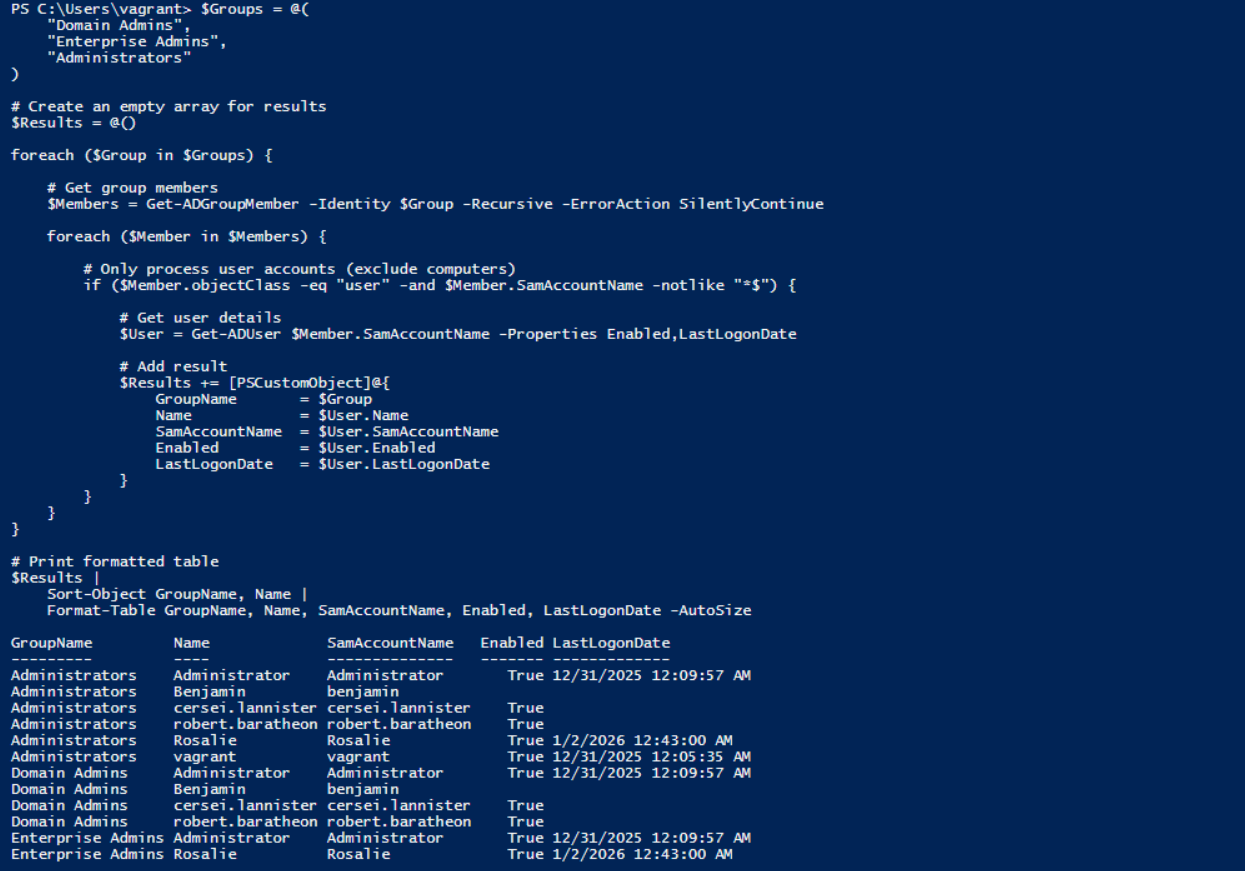
Reducing administrative group membership starts with visibility and justification. The first question is not who has access, but why they have it. In most environments, the number of accounts that truly require permanent Enterprise Admin or Domain Admin privileges is far lower than what is currently configured.
A practical first step is to review actual usage. Looking at last logon timestamps for privileged accounts already provides valuable insight. Accounts that have not logged in for months, or even years, are strong candidates for review. In many cases, these accounts are no longer used at all and can be disabled or removed with minimal impact.
This step alone often leads to immediate risk reduction without requiring architectural changes.
Beyond that, administrative tasks should be reviewed and broken down where possible. Many activities do not require full Domain Admin privileges and can be delegated using more granular permissions. Microsoft provides extensive guidance and built-in delegation mechanisms to support this model, allowing organizations to reduce reliance on all-powerful admin groups.
Domain Admin and Enterprise Admin access should be reserved for activities that genuinely require that level of control, such as forest-wide changes or critical recovery operations. Even then, best practice is to limit usage in time and scope, rather than granting permanent access.
Reducing excessive privileged group membership is not about restricting administrators, but about protecting the environment. Fewer privileged accounts mean fewer high-impact targets and a much smaller blast radius when something goes wrong.
$Groups = @(
    "Domain Admins",
    "Enterprise Admins",
    "Administrators"
)

# Create an empty array for results
$Results = @()

foreach ($Group in $Groups) {

    # Get group members
    $Members = Get-ADGroupMember -Identity $Group -Recursive -ErrorAction SilentlyContinue

    foreach ($Member in $Members) {

        # Only process user accounts (exclude computer/'$' accounts)
        if ($Member.objectClass -eq "user" -and $Member.SamAccountName -notlike "*$") {

            # Get user details
            $User = Get-ADUser $Member.SamAccountName -Properties Enabled,LastLogonDate

            # Add result
            $Results += [PSCustomObject]@{
                GroupName       = $Group
                Name            = $User.Name
                SamAccountName  = $User.SamAccountName
                Enabled         = $User.Enabled
                LastLogonDate   = $User.LastLogonDate
            }
        }
    }
}


$Results |
    Sort-Object GroupName, Name |
    Format-Table GroupName, Name, SamAccountName, Enabled, LastLogonDate -AutoSize
Inactive and forgotten privileged accounts
Inactive but enabled privileged accounts
Another frequent issue is privileged accounts that are no longer actively used but remain enabled. These accounts often originate from earlier phases in the environment’s lifecycle. They may belong to former employees, legacy service accounts or temporary administrative accounts created during projects, migrations or incident response activities.
In practice, these accounts are especially risky because they were often created under different security assumptions. Temporary or emergency admin accounts are frequently given simpler passwords to speed up work. Older accounts may predate current password policies and therefore use weaker or outdated credentials. Over time, these accounts fade from operational awareness, but their privileges remain intact.
From an attacker’s perspective, inactive privileged accounts are attractive. They are rarely monitored, rarely used and therefore unlikely to trigger immediate suspicion when they suddenly become active.
An attacker who gains access to such an account does not need to interfere with daily operations. There is no need to hijack an actively used administrator account or risk detection. Quietly using an inactive privileged account is often enough to maintain access and escalate control.
Identifying and disabling inactive privileged accounts should therefore be a routine process, not an exception. Reviewing last logon times provides a practical starting point to determine whether accounts are still actively used. Accounts that have not logged in for extended periods should be reviewed, validated and, where possible, disabled.
If there is no clear operational need for an account to exist, it should be removed entirely. Leaving inactive privileged accounts enabled effectively preserves old security decisions long after they are no longer justified.
The script below lists all users who have either never logged on or have not logged on for the past 90 days. The identified users are exported to a CSV file to provide a user-friendly experience in Excel, stored at C:\Temp. If this is not desired, the CSV export can be removed from the script. For inactive users, their group memberships are also included in the output.
Note: It is recommended not to rely blindly on the last logon time when disabling or deleting users. This script should be used as an indicator only to help identify potentially inactive accounts and not confirming of it.
# Number of days since last logon
$DaysInactive = 90
$CutoffDate   = (Get-Date).AddDays(-$DaysInactive)

$OutputFolder = "C:\Temp"
$OutputFile   = Join-Path $OutputFolder "InactiveUsersWithGroups.csv"

# Ensure the export directory exists
if (-not (Test-Path $OutputFolder)) {
    New-Item -Path $OutputFolder -ItemType Directory | Out-Null
}

# Get all Active Directory users who have not logged on for X days
Get-ADUser -Filter * -Properties LastLogonDate, MemberOf |
Where-Object {
    $_.Enabled -eq $true -and
    $_.SamAccountName -notlike '*$' -and
    ($_.LastLogonDate -lt $CutoffDate -or $_.LastLogonDate -eq $null)
} |
Select-Object `
    Name,
    SamAccountName,
    Enabled,
    @{ Name = "LastLogonDate"; Expression = {
        if ($_.LastLogonDate) { $_.LastLogonDate.ToString("yyyy-MM-dd HH:mm:ss") } else { "" }
    }},
    @{ Name = "Groups"; Expression = {
        $groupNames = foreach ($groupDn in ($_.MemberOf | Sort-Object)) {
            (Get-ADGroup -Identity $groupDn).Name
        }
        $groupNames -join " | "
    }} |
Sort-Object LastLogonDate |
Export-Csv -Path $OutputFile -NoTypeInformation -Encoding UTF8 -Delimiter ';'
Disabled privileged accounts still present in the directory
Even disabled privileged accounts represent risk. While they cannot be used directly, they often keep their original group memberships and permissions, and they remain part of the directory structure.
In some attack scenarios, disabled accounts can be re-enabled by an attacker who already gained elevated privileges. In others, they provide useful information about naming conventions, past access patterns and administrative practices.
A directory cluttered with disabled privileged accounts also makes oversight harder. It becomes more difficult to distinguish between legitimate, active accounts and those that should no longer exist.
Cleaning up disabled privileged accounts reduces complexity and improves visibility. Accounts that are no longer required should be removed after appropriate review and approval.
Separation of administrative and user accounts
One of the most effective, yet still frequently overlooked, controls in Active Directory security is the strict separation of administrative and user accounts. In many environments, the same account is used for email, web browsing, document access and administrative tasks. While this may be convenient, it significantly increases risk.
From an attacker’s perspective, this setup is ideal. Compromising a user through phishing, malware or credential reuse is relatively easy. If that same account also has administrative privileges, the attacker immediately gains elevated access without needing to perform any additional steps. What could have been a limited user compromise quickly turns into full control over critical systems.
Separating administrative and user accounts breaks this direct path. Administrators should have at least two distinct identities. A standard user account used for daily activities such as email, browsing and collaboration, and a dedicated administrative account used exclusively for privileged tasks. These administrative accounts should only be used when necessary and should never be used for general-purpose activities.
This separation also allows for tighter technical controls. Administrative accounts can be restricted to log on only to specific systems, such as management servers or hardened admin workstations. They can be excluded from internet access, email usage and unnecessary applications, significantly reducing their exposure to common attack vectors.
From an operational point of view, this approach may initially feel like an extra step. In practice, it creates clarity. Administrators know which account to use for which task, logging and monitoring become more meaningful, and suspicious behavior is easier to detect.
Most importantly, separation limits impact. If a user account is compromised, the attacker does not automatically gain administrative access. This forces additional actions, increases noise and raises the likelihood of detection.
Separation of administrative and user accounts is not a theoretical best practice. It is a practical control that directly addresses some of the most common real-world attack paths seen in Active Directory environments.
Privileged Access Management as a reinforcing control
Privileged Access Management (PAM) is often mentioned as a solution to problems around privileged accounts. In the context of Active Directory hardening, PAM is not a replacement for fundamental measures such as cleaning up administrative group membership or separating user and administrative identities. Instead, it is a reinforcing control that helps apply these principles consistently and at scale.
The core concept behind PAM is the elimination of standing privileges. Rather than maintaining permanent membership in highly privileged groups such as Domain Admins or Enterprise Admins, access is granted only when it is actually required. Privileges are assigned temporarily and automatically revoked once the task is completed. As a result, privileged access exists only at the moment it is needed.
From an attacker’s perspective, this significantly changes the value of compromised credentials. Stealing an administrative account no longer guarantees long-term or reusable privileged access. Even if an attacker gains control of an admin account, that account may not have any active privileges at the time of compromise. This makes privilege escalation more difficult, time-bound and far more likely to be detected.
PAM directly supports the separation of user and administrative identities. Administrative accounts can be designed as privilege-only identities that are never used for email, web browsing or other day-to-day activities. This greatly reduces exposure to phishing and malware and aligns with the principle that administrative identities should have a fundamentally different risk profile than regular user accounts.
It also improves visibility and governance around privileged access. Access requests can be subject to approval, usage can be logged per session, and access patterns can be reviewed over time. This makes it easier to answer basic but critical questions: who had privileged access, when it was used, and whether that access was justified. This increased visibility is especially valuable for less obvious but powerful groups such as DNSAdmins, Backup Operators or Server Operators, which are often overlooked in traditional reviews.
It is important to note that PAM does not automatically fix existing hygiene issues. Excessive group membership, forgotten accounts and unclear ownership must still be addressed directly. PAM strengthens a well-designed access model, but it does not compensate for poor governance or lack of cleanup.
When implemented as part of a broader hardening strategy, PAM directly supports the goals outlined in this chapter: reducing standing privileges, shrinking the attack surface and breaking common privilege escalation paths. Privileged access becomes a controlled exception rather than a permanent default.
Why this keeps happening
Why this is often overlooked
Privileged account sprawl usually develops slowly. Each individual decision feels reasonable at the time. Someone needs temporary access. A project requires elevated rights. An account is disabled but kept “just in case”.
Over time, these decisions accumulate. Documentation is lost, ownership becomes unclear and privileged access becomes the default rather than the exception.
Because environments continue to function, the risk remains largely invisible until it is abused.
What needs to change
Effective privileged account control requires clear rules and consistent enforcement.
Privileged group membership should be minimal and regularly reviewed. Inactive and unused privileged accounts must be identified and removed. Disabled privileged accounts should not be kept indefinitely without justification.
Most importantly, administrative and user activities must be strictly separated. This reduces the impact of common attack techniques and significantly raises the bar for an attacker.
Privileged access should be treated as a sensitive operation, not a convenience feature.
Closing thoughts
Privileged account control is not about eliminating all risk, but about limiting impact and regaining control. In almost every serious Active Directory incident.
Excessive admin group membership, forgotten privileged accounts and poor separation between user and administrative identities all create shortcuts for attackers. None of these issues on their own look dramatic. Together, they significantly lower the effort required to take control of an environment.
The measures described in this chapter do not require complex tooling or major architectural changes. They require visibility, ownership and the willingness to periodically question past decisions. Simply knowing who has privileged access, why they have it and whether it is still needed already reduces risk substantially.
By reducing the number of privileged accounts, cleaning up unused access and enforcing separation of duties, organizations make privilege escalation harder, noisier and more detectable. That shift alone can prevent an initial compromise from turning into a domain-wide incident.
Privileged access will always exist in Active Directory. The goal is not to remove it, but to ensure it is intentional, limited and well understood.
This closes the second step of the hardening roadmap. With credentials better protected and privileged access under control, the foundation is set for addressing more advanced attack paths in the next phase.
Let's Connect
Are you in need of assistance from our Active Directory Experts, or are you left with some questions after reading this blog post? Don't hesitate to fill out the contact form below!