In the previous post, we established Microsoft Entra ID as the primary enforcement point for access to cloud resources and discussed how to secure identities with Multi-Factor Authentication and password protection. In this post, we move beyond static authentication and implement dynamic identity trust, where signals about identity and sign-ins are evaluated in real time to make access decisions.
In traditional configurations, once a user completed MFA, they were considered “trusted” for the session. Nowadays, identity-based attacks such as Attacker-in-the-Middle (AiTM), credential attacks, and token replay are common, and this static model is no longer sufficient. Instead, we need to evaluate trust continuously and adapt access decisions based on signals such as risk, device state, location, and behavior.
This is where identity risk and risk-based enforcement come into play.
Licensing note:
To use identity risk signals and risk-based Conditional Access for user accounts in your tenant, you need Microsoft Entra ID Premium P2 licensing. This licensing enables Entra ID Protection, real-time risk detection, user risk policies, and risk remediation actions.
Licensing note:
Limited security reports about risky users and sign-ins are already available with Microsoft Entra ID Free. Additionally, information about certain risk detections is also included with Entra ID Premium P1 licenses.
Licensing note:
For workload identities, such as Applications, Service Principals, and Managed Identities, you need Workload Identities Premium licenses. Entra ID Protection for workload identities provides offline detection for suspicious sign-ins, leaked credentials, and suspicious API traffic to Microsoft Graph, amongst others.
What Is Entra ID Protection and How Is Risk Calculated?
Microsoft Entra ID Protection introduces two risk signals:
- Sign-in risk: real-time risk evaluation during the authentication, before the access token is issued, as well as offline risk evaluation, and covers amongst others:
- Unfamiliar sign-in properties
- Verified threat IP addresses (Microsoft Threat Intelligence Center)
- Impossible travel (leverages Microsoft Defender for Cloud Apps telemetry)
- Real-time password spray detection
- Anomalous token and token replay detection
- User risk: offline risk evaluation based on past signals, and covers amongst others:
- Attacker in the Middle (correlated through Microsoft Defender XDR)
- Leaked credentials
- Possible attempt to access Primary Refresh Token (Microsoft Defender for Endpoint)
- Suspicious sending patterns (Microsoft Defender for Office 365)
As you can see in the list above, some detections are powered by Microsoft Defender XDR products such as MDE, MDO, and MDCA. Some detections rely on telemetry from Microsoft Defender products. Full cross-signal correlation requires the appropriate Defender licensing (commonly included in Microsoft 365 E5 or equivalent add-ons).
These shared signals improve detection accuracy and confidence levels. For example, a suspicious login combined with endpoint compromise signals may elevate the user risk score. In certain high-confidence compromise scenarios, Microsoft Defender can automatically restrict access or disable the user account before Conditional Access policies evaluate a new authentication attempt. This is done through automatic attack disruption within Microsoft Defender XDR.
More information about risk detections in Entra ID can be found here: https://learn.microsoft.com/en-us/entra/id-protection/concept-identity-protection-risks.
Risky Workload Identities and Agents (Preview)
Entra ID Protection also extends to workload identities such as Applications, Service Principals, and Managed Identities. These identities cannot perform Multi-Factor Authentication and often hold elevated privileges through Microsoft Graph API permissions, Entra ID roles, or Azure RBAC roles. The compromise of such highly privileged non-human identities can therefore have significant impact on your organization.
Entra ID Protection provides the following offline detections for workload identities:
- Suspicious API traffic to Microsoft Graph
- Abnormal authentication patterns for service principals
- Leaked credentials associated with applications
In addition, Microsoft recently introduced Risky Agents (Preview), which help detect potentially compromised automation agents interacting with your tenant.
These capabilities extend the Zero Trust identity model beyond human users and ensure that non-human identities are also continuously evaluated.
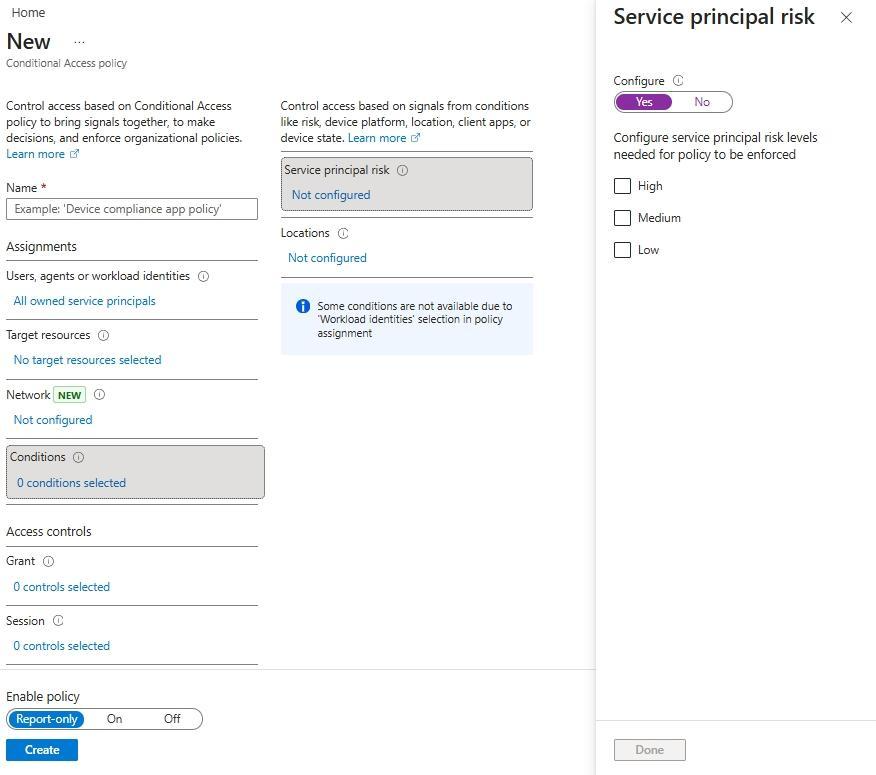
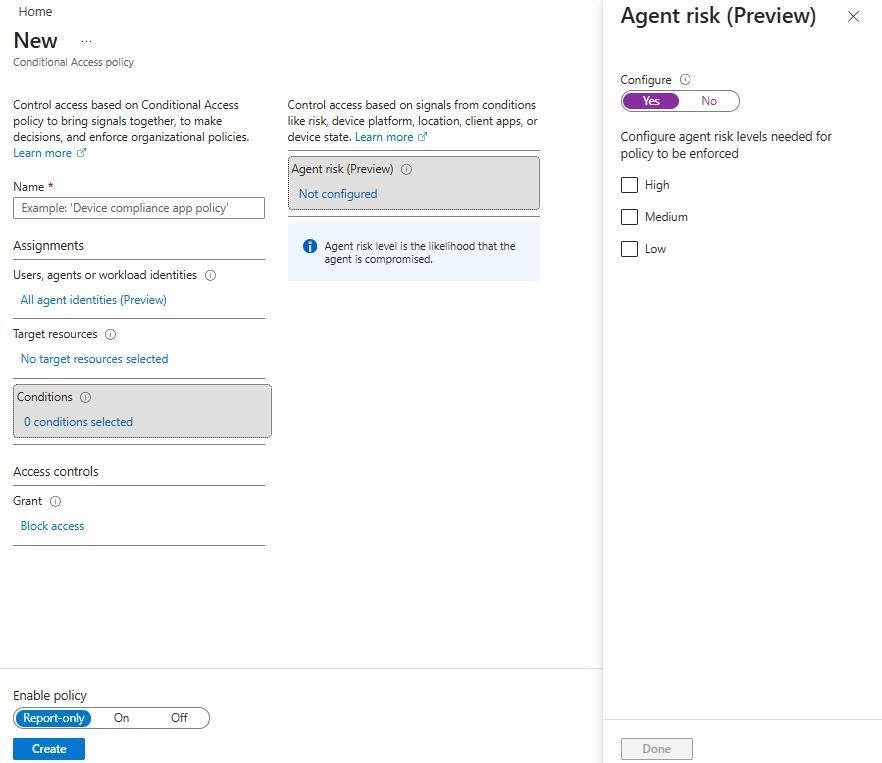
Similarly to human identities, risk-based Conditional Access policies can be implemented to block risky agents or workloads identities:
- Risk-based policy for Workload Identities:
-
Risk-based policy for Agents (Preview):
Risk-based Enforcement with Conditional Access
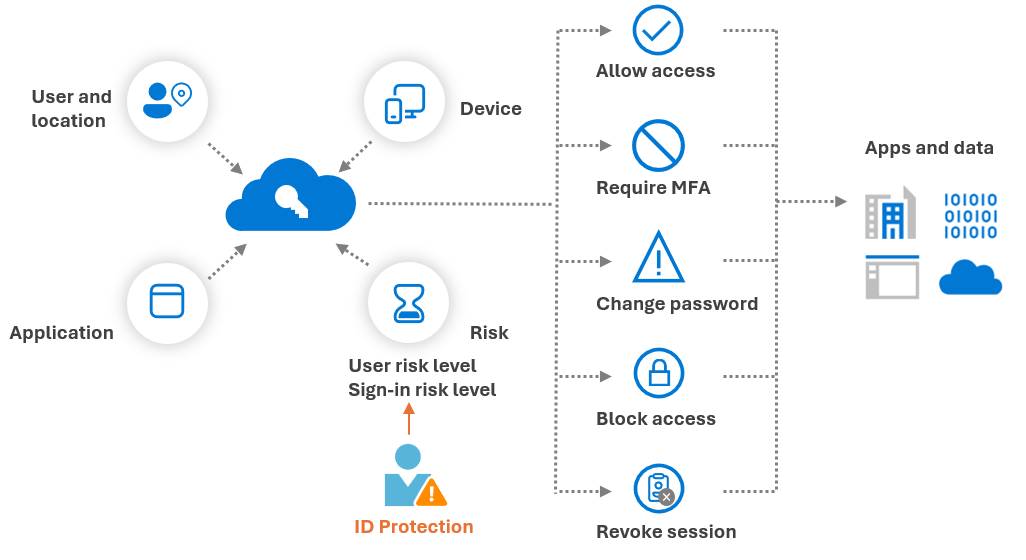
Risk signals alone are informative. Their value is realized when enforcement with Conditional Access is applied. In Conditional Access, the following controls can be implemented:
- Require (strong) Multi-Factor Authentication for medium and high sign-in risk
- Block access or require risk remediation for high risk users
For remediating risky users, Microsoft recently introduced a new control named "Require risk remediation", which is in Preview at the time of writing. This control lets Microsoft manage the appropriate remediation flow for all authentication methods, including password-based authentication and passwordless:
- If there is evidence that a password has been involved (leaked credentials, password spray, or session history linked to password compromise), Entra ID Protection will enforce a secure password change and revoke active sessions.
- If there is no indication of password compromise (for example anomalous token, impossible travel, or unfamiliar sign-in properties), Entra ID will revoke active sessions without forcing a password reset. This approach is particularly important for passwordless users. Even in passwordless environments, a password object still exists in the directory, but forcing password reset is not always necessary.
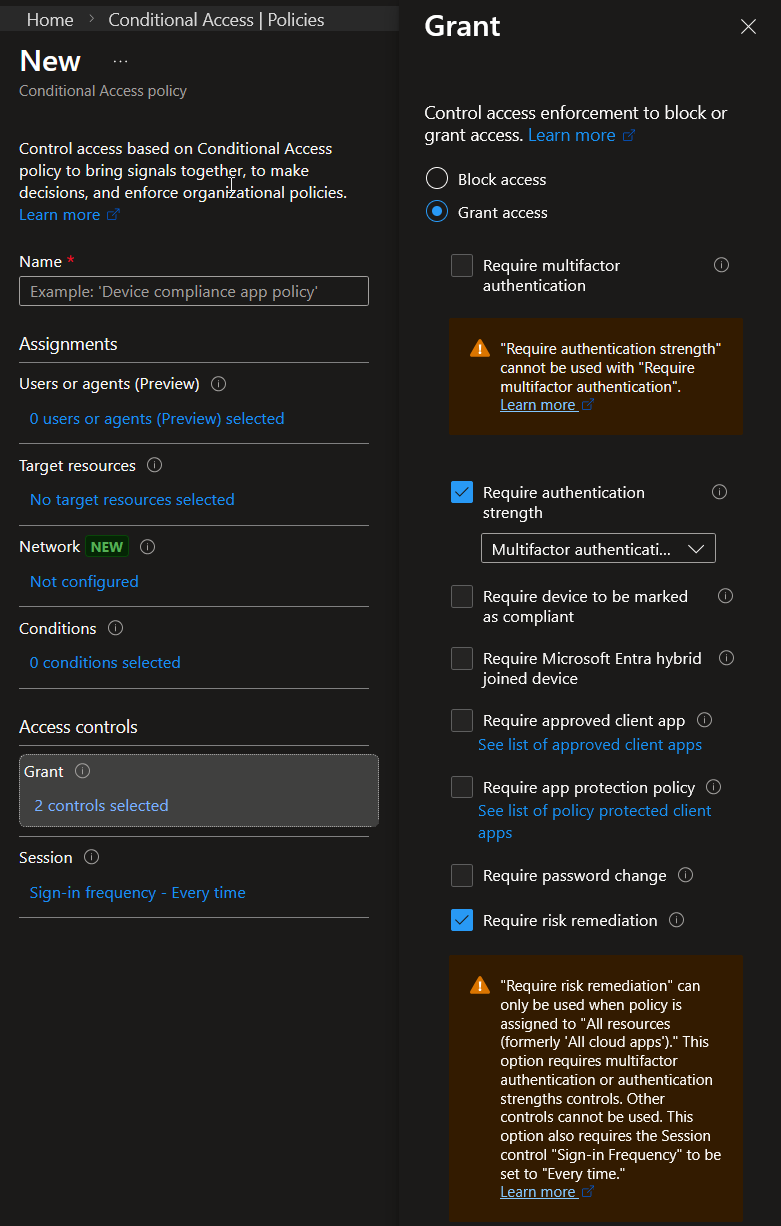
Important notes for the "Require risk remediation" grant control:
- Enabling "Require risk remediation" will always set the "Require authentication strength" grant control and set the session sign-in frequency to "Every time":
- External and guest users, as well as workload identities are not supported.
Finally, it is important to note that Entra ID Protection evaluates authentication to cloud resources that rely on Entra ID. It cannot protect interactive on-premises AD logons and detect identity attacks in your Active Directory environment.
Hybrid Identity Visibility with Defender for Identity
To address this, Microsoft Defender for Identity (MDI) could be used. MDI is a cloud-based solution part of the Microsoft Defender XDR suite that helps monitor on-premises AD identities.
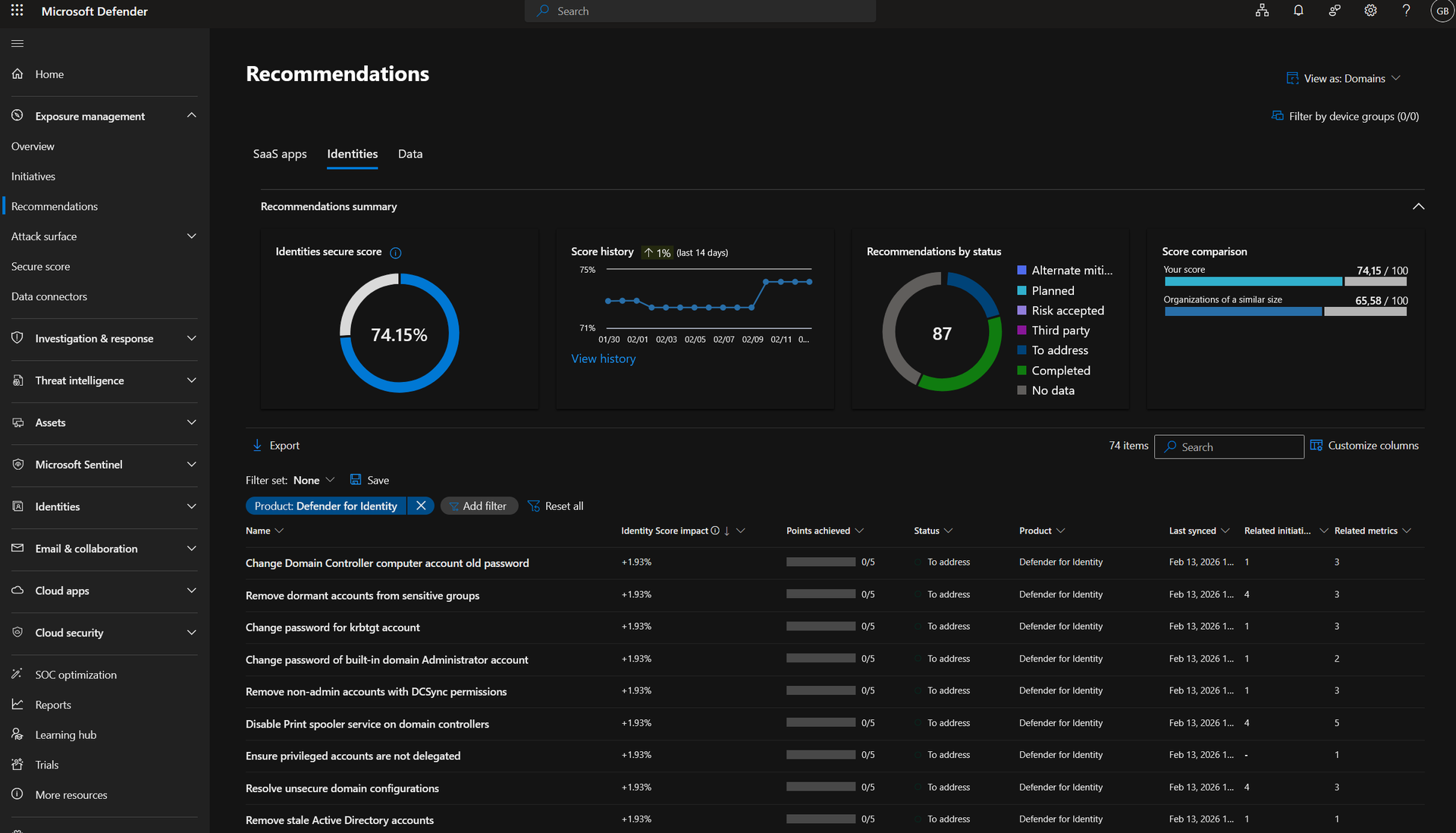
MDI provides capabilities complementary to Entra ID Protection by using real-time analytics to detect threats and respond to attacks with automatic attack disruption (for high confidence incident) and manual actions, such as disabling users in Active Directory directly. Furthermore, it provides identity security posture assessments in Microsoft Defender Exposure Management:
Operationalizing Identity Protection
Now that we have seen what is Entra ID Protection and what can be done to dynamically adapt controls based on risk signals, we will discuss how it can be configured. If you are just starting with Conditional Access, a detailed guide will be covered later in this roadmap.
Enforcement
Depending on your current usage of Conditional Access, you have the following use cases:
- Microsoft-managed policies: if you are licensed for Entra ID Protection and do not make use of it yet, a Microsoft-managed policy will be created automatically to require MFA when a high sign-in risk is detected. Note that the policy only applies to users that are MFA capable. More information about this managed policy here: https://learn.microsoft.com/en-us/entra/identity/conditional-access/managed-policies#multifactor-authentication-and-reauthentication-for-risky-sign-ins
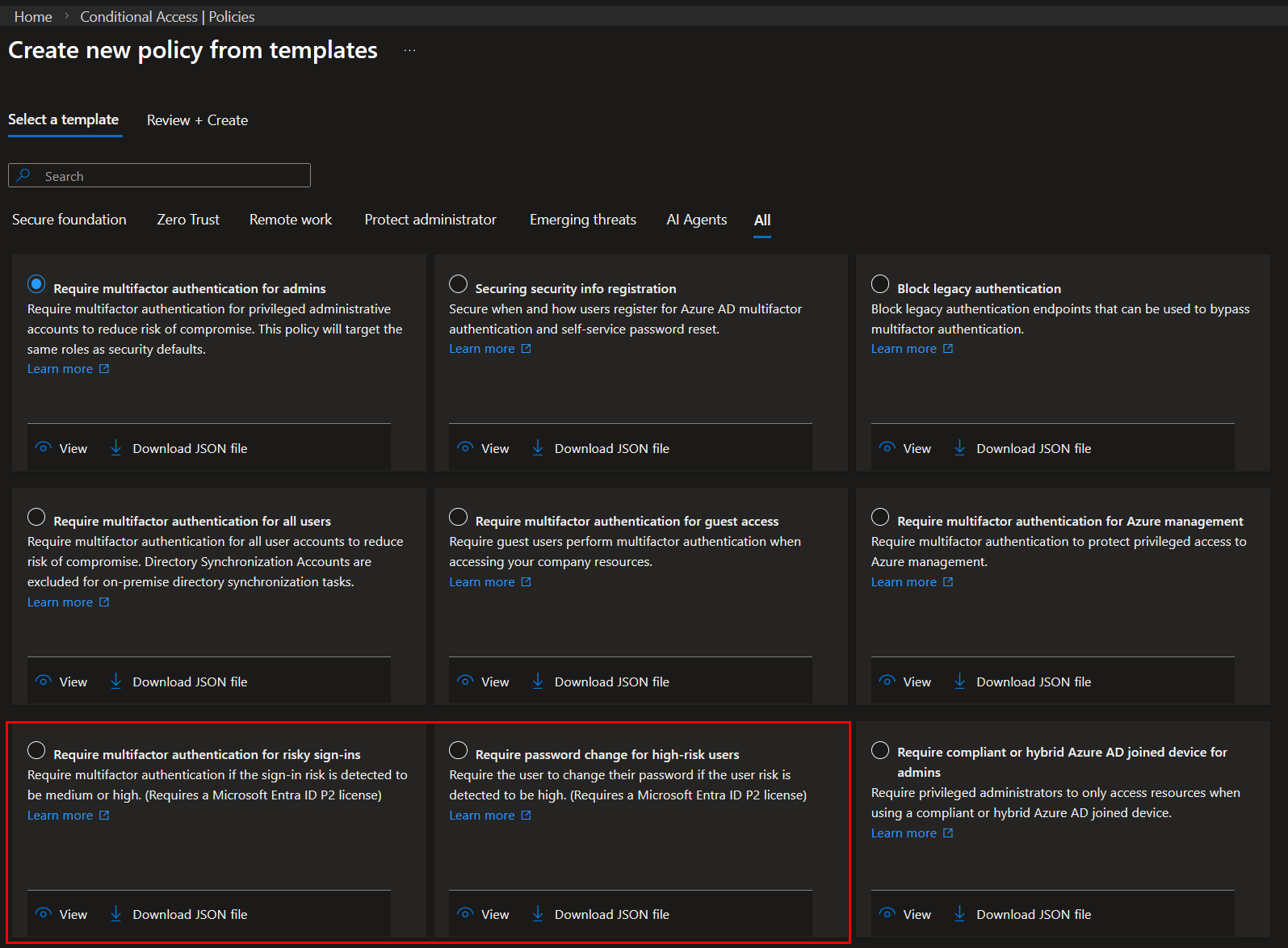
- Template policies: if you have limited time and do not need many customizations, template policies can be used for enforcing MFA for risky sign-ins and requiring password change for high-risk users.
- Custom policies: a custom policy allows for maximum customization and gives greater flexibility.
The common configuration for risk-based Conditional Access policies is as follows:
- Require MFA for medium or high sign-in risk;
- Require password change or block access for high user risk.
Prerequisites
Before implementing risk-based Conditional Access policies, make sure to:
- Configure named locations in Entra ID and IP ranges in Microsoft Defender for Cloud Apps to reduce false positives.
- For the sign-in risk policy, all users in scope should be MFA capable. Users without MFA registered will be blocked if they are associated to a sign-in risk. The Multifactor authentication registration policy in Entra ID Protection can be used for that purpose.
- For the user risk policy, Self-Service Password Reset should be configured and enabled for users. It is recommended to disable the administrator SSPR policy, so that password changes for administrative accounts are always handled by another administrator. If PIM is used for Entra ID roles, users that did not elevate will fall under the user SSPR policy. Therefore, administrative accounts should also be excluded from it.
- Identify emergency and user accounts used as service accounts.
- Communicate changes to SOC and support teams.
Rollout
Once done, the deployment process looks as follows:
- Use report-only mode for your entire organization or for the desired policy scope. Using report-only mode for a limited pilot group will only provide visibility into that group and does not reflect tenant-wide impact.
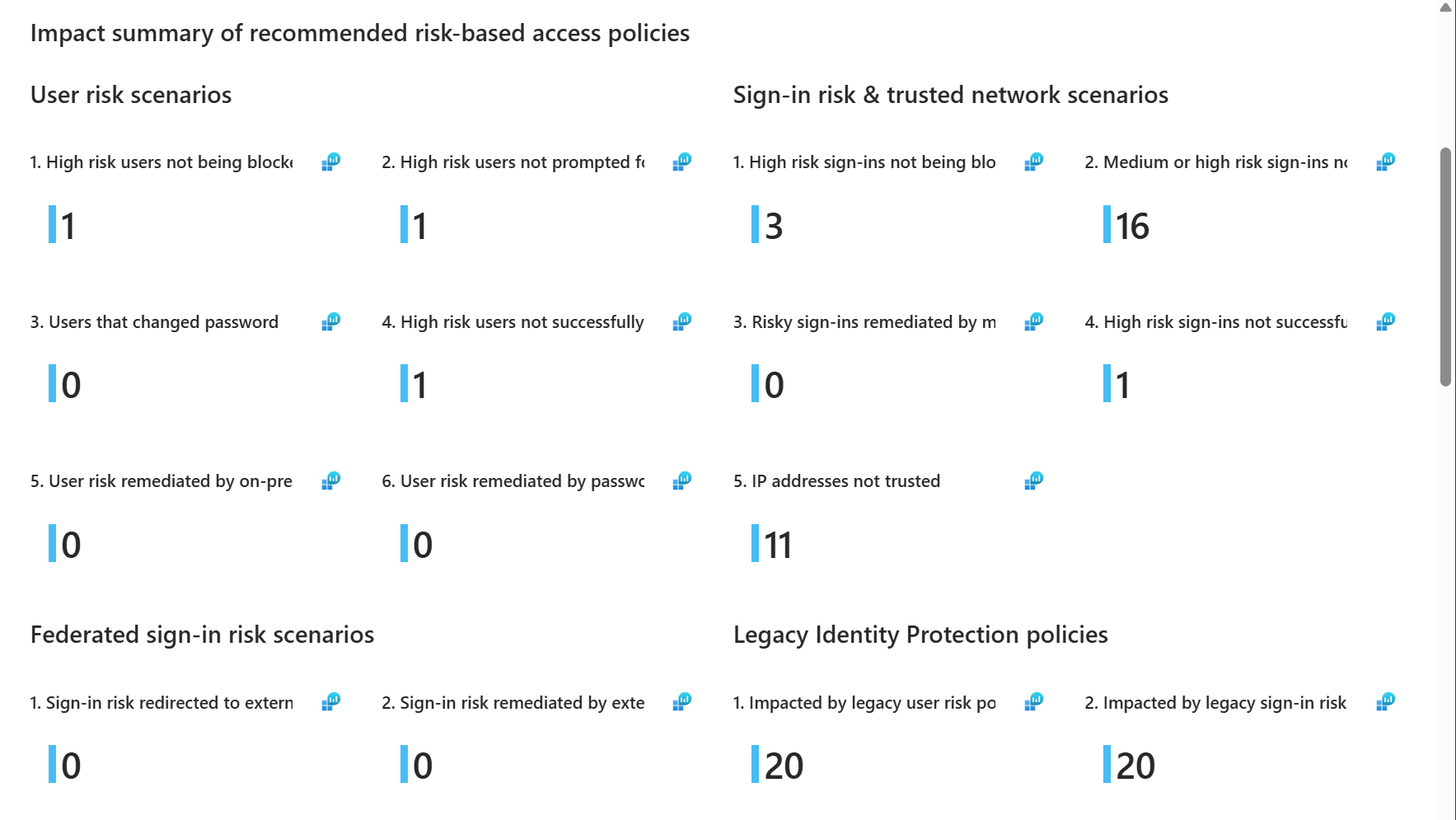
- Review the Risk Policy Impact Analysis workbook in Entra ID Protection: This workbook gives an overview of the potential impact of risk-based Conditional Access policies without the need for having enabled policies or in report-only mode. It also shows users that were not covered by a risk-based policy.
- Defines whether guest and external users should be included in the user risk policy. If a password change is requested when a user is associated with a user risk, guest and external users might be blocked when accessing your tenant. Both the home and resource tenants must have compatible remediation policies configured, otherwise, enforcement behavior may be inconsistent.
- Then, when enabling the policy, start with a pilot user group. An example of a commonly used first pilot group is the IT department as they have a higher technical maturity.
- Progressively increase the scope of the policy to reach the desired scope.
Monitoring and Feedback
Enabling Entra ID Protection and risk-based Conditional Access is not a “set and forget” configuration. Risk scoring is dynamic and continuously refined, and it requires operational monitoring.
Review Risk Detections
Administrators should regularly review the following reports in Entra ID Protection:
- Risky sign-ins
- Risky users
- Risk detections
- Risky workload identities
- Risky agents (Preview)
These reports provide visibility into active and past risk detections, and applied (self) remediation actions.
Confirm Risk Detections
One often overlooked capability is the ability to confirm a detection as:
- Confirmed compromised: sets the user risk to high, which can trigger risk-based Conditional Access.
- Dismissed as safe: clears the associated risk state when the detection is determined to be a false positive.
Providing feedback helps improve detection quality over time. When a user is confirmed as compromised, Entra ID:
- Elevates the user risk level
- Enables configured automated remediation (e.g., password reset or access block via policy)
- Contributes feedback signals to Microsoft’s detection systems
Similarly, dismissing false positives helps reduce operational noise and improves risk signal hygiene. This feedback loop is essential in mature environments where risk-based enforcement is heavily relied upon.
Identity Risk Management Agent
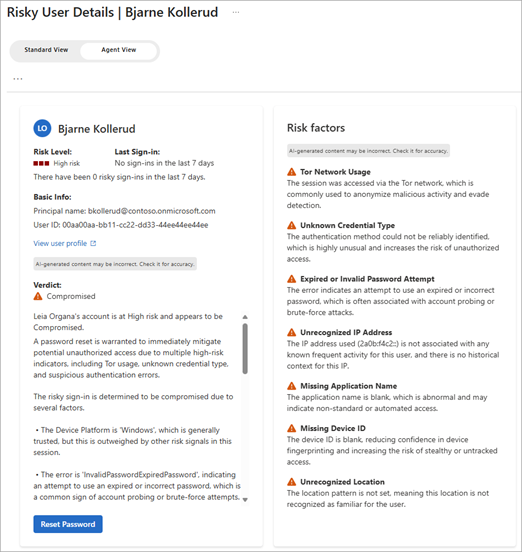
The Identity Risk Management Agent (Preview) in Entra ID Protection allows to analyse risky identities and suggests actions to remediate them. The Identity Risk Management Agent is currently available in Entra ID Premium P2 licenses but is still in Preview. Security compute units (SCUs) must also be available.
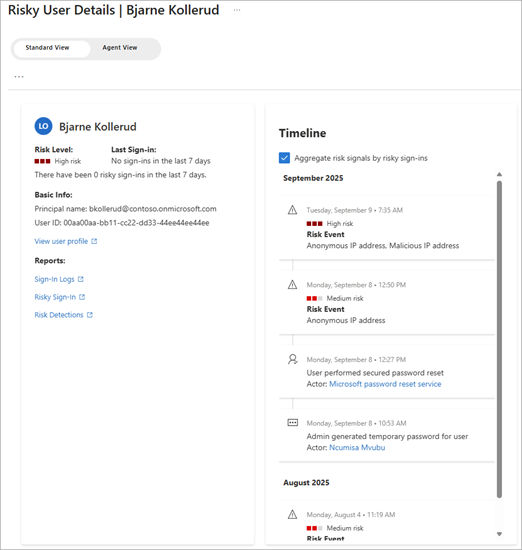
The agent will scan for new risky users which have a risk state of "At risk", provide a contextual analysis, and generate findings and recommendations, such as "Dismiss risk" or "Reset password".
Here is a side by side comparison of the user risk view without (left) and with (right) the Identity Risk Management Agent:
|
|
Wrapping Up
In this second part of the Microsoft 365 Zero Trust roadmap, we moved from static Multi-Factor Authentication to dynamic identity trust. We explored how Microsoft Entra ID Protection evaluates sign-in risk and user risk, how detections leverage signals from Microsoft Defender XDR, and how these signals can be enforced using risk-based Conditional Access policies.
By integrating Entra ID Protection and shared security telemetry from Microsoft Defender XDR with Conditional Access, organizations can continuously reassess trust based on real compromise indicators. This makes access decisions context-aware and aligned with Zero Trust principles.
However, identity signals alone are not sufficient. Even a legitimate user can sign in from a compromised or unmanaged device. In the next post, we will extend this model by introducing device signals, strengthening the Endpoints pillar and further refining how access decisions are made in Microsoft 365.
Let's Connect
Are you in need of assistance from our Microsoft Cloud Experts, or are you left with some questions after reading this blog post? Don't hesitate to fill out the contact form below!